Note
Access to this page requires authorization. You can try signing in or changing directories.
Access to this page requires authorization. You can try changing directories.
A transit hub creates a virtual hub within a community Virtual WAN that provides a secure connectivity path between the community and an external private network. You can associate a transit hub with a PrivateNetwork rule within a community endpoint to enable enclaves to connect to trusted private networks outside the community boundary.
Architecture of a transit hub
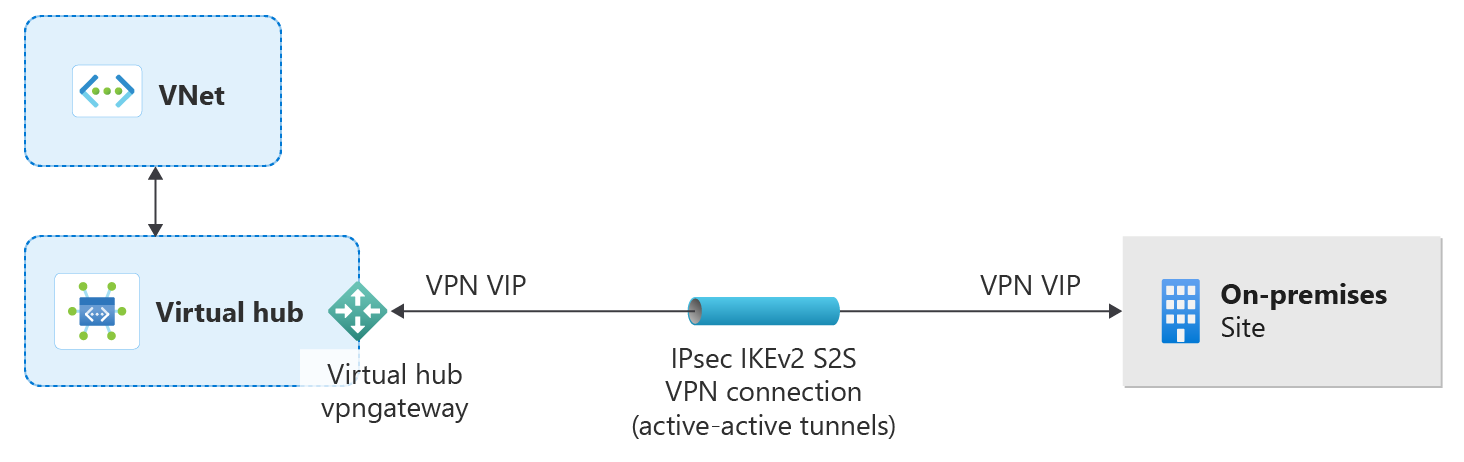
Supported connection types
Transit hubs support the following connection types:
- Gateway - Site-to-site VPN connections for secure connectivity over the public internet
- ExpressRoute - Private, dedicated connections through Microsoft's global network
- Peering - Direct virtual network peering for Azure-to-Azure connectivity
Site-to-site VPN connections
Transit hubs provide site-to-site (S2S) VPN connectivity for on-premises environments. This approach reduces the complexity of establishing hybrid connectivity between your community and external networks.
Benefits of S2S connections
- Reduced configuration steps - Simplified setup for common connectivity scenarios
- Pre-configured security settings - Default security policies aligned with Azure best practices
- Automated routing - Automatic route propagation between the community Virtual WAN and connected networks
Supported scenarios
S2S connections support the following deployment scenarios:
| Scenario | Description |
|---|---|
| On-premises datacenter | Establish secure connectivity from traditional on-premises infrastructure |
| Branch office | Connect remote branch locations through VPN tunnels |
Configuration requirements
To use S2S connections:
- Ensure your on-premises VPN device supports IKEv2 and BGP.
- Gather your on-premises network address ranges (CIDR blocks)
- Identify the public IP address of your on-premises VPN gateway
- Configure the transit hub with your connection parameters
For detailed configuration steps, see Create a transit hub.
Transit hub configuration
You configure a transit hub by using one of the supported connection types. The connection type determines whether the hub uses a VPN gateway, ExpressRoute, or virtual network peering for connectivity.
For step-by-step instructions, see Create a transit hub.
Security and compliance
Transit hubs use the following features to govern traffic:
- Azure Firewall - Community-level firewall policies filter all traffic entering and leaving the community
- Encryption - VPN connections use IPsec encryption.
- Logging - You can log connection activity for audit and compliance purposes.