Hi @Jardine, Anna,
I hope you are doing well.
Thank you for reaching out and sharing your experience regarding Planner with Premium plans. After my research, I found that copying a plan is not supported if the plan was created without a group.
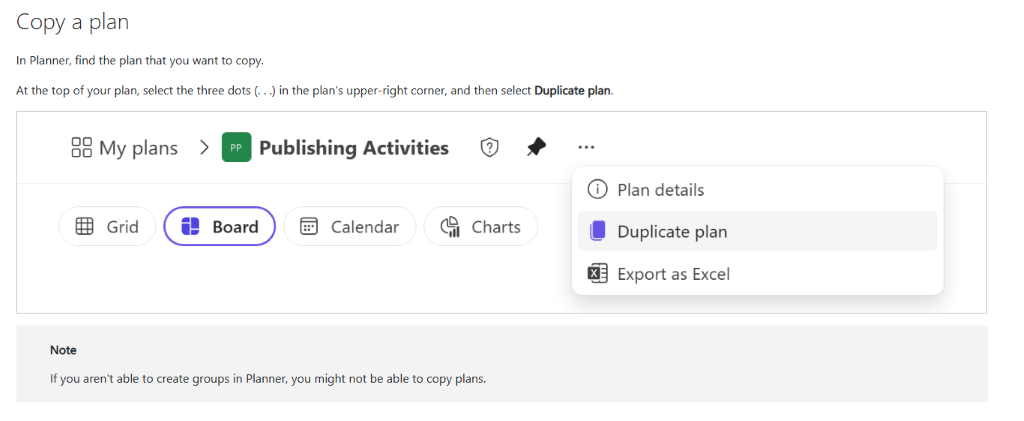
That said, when you create a new plan via your Planner, you need to add a group to have the option to copy. In this case, I was able to reproduce the behavior by creating 2 plans:
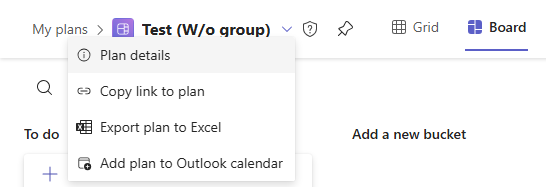
- One plan with no group added
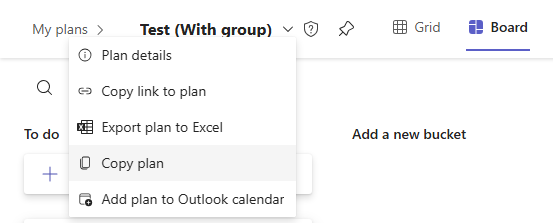
- One plan with a group added
For the plan with no group added there is no “Copy plan” option.
For the plan with "a group added", you will see the “Copy plan” option appear as shown in the image.
For more information, please refer to this official document from Microsoft: Copy a plan | Microsoft Support
Regarding the issue with Power Automate, currently, Planner connectors in Microsoft Power Automate only supports basic plans only. This is by design rather than a misconfiguration.

For reference Planner - Connectors | Microsoft Learn
I completely understand that this creates a gap for teams using Planner Premium as a template for recurring or repeatable projects. While this is currently expected behavior, I strongly recommend submitting feedback directly to Microsoft via the Feedback Portal so the Planner product team can review and prioritize this request in future updates.
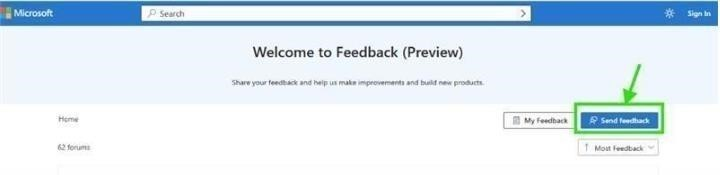
Sharing your experience through this channel is the most impactful way to advocate for a change that would benefit you and other users.
Note: As community moderators, we kindly ask for your understanding that our access to internal development details is limited. Our primary role is to guide users toward the appropriate resources and support channels. While we may not have influence product design decisions and have limited access to internal development details , we’ll continue doing our best to support you within the scope of our responsibilities.
Once you’ve submitted your feedback, feel free to share the link here. I’d be happy to upvote it to help increase its visibility. Moreover, if you are unable to submit feedback, please inform me at your convenience. In that case, I will gladly assist by submitting it on your behalf to ensure your request is properly captured.
Additionally, as other users have raised similar concerns and may not be aware of where to share their feedback, I hope this response helps clarify the situation and suggests a potential next step. Upvoting this information can make it more visible to others in the community who may be facing the same issue, making it easier for them to find guidance and contribute their feedback as well.
Thank you again for your time and for raising this important usability concern. If you have any further questions or need additional assistance, please don’t hesitate to reach out.
Wishing you a smooth rest of your day.
If you have extra questions about this answer, please click "Comment".
Note: Please follow the steps in our documentation to enable e-mail notifications if you want to receive the related email notification for this thread.
' cx='32' cy='32' r='32' /%3E%3Ctext x='50%25' y='55%25' dominant-baseline='middle' text-anchor='middle' fill='%23FFF' %3EJA%3C/text%3E%3C/svg%3E)

' cx='32' cy='32' r='32' /%3E%3Ctext x='50%25' y='55%25' dominant-baseline='middle' text-anchor='middle' fill='%23FFF' %3EDH%3C/text%3E%3C/svg%3E)
' cx='32' cy='32' r='32' /%3E%3Ctext x='50%25' y='55%25' dominant-baseline='middle' text-anchor='middle' fill='%23FFF' %3EJT%3C/text%3E%3C/svg%3E)
