Note
Access to this page requires authorization. You can try signing in or changing directories.
Access to this page requires authorization. You can try changing directories.
The portals Web API enables a richer user experience inside Power Pages sites. You can use the Web API to perform create, read, update, and delete operations across all Microsoft Dataverse tables from your webpages. For example, you can create a new account or update a contact without using a form or multistep form by using the portals Web API.
The Web API uses the /_api route (for example, https://yoursite.powerappsportals.com/_api/accounts) and follows a RESTful pattern similar to the Dataverse Web API.
Important
- The portals Web API is built for creating a rich user experience inside portal pages. It isn't optimized for third-party services or application integration. Using the portals Web API to integrate with other Power Pages sites isn't supported.
- Portals Web API operations are limited to tables related to data—for example, accounts, contacts, or your custom tables. Configuring table metadata or portal configuration table data—for example, configuring portals tables such as adx_contentsnippet, adx_entityform, or adx_entitylist—isn't supported by using the portals Web API. For a complete list, see unsupported configuration tables later in this article.
- The portals Web API benefits from server-side caching, so subsequent calls to the Web API are faster than the initial calls. Clearing the portal server-side cache causes temporary performance degradation.
- Portals Web API operations require a Power Pages license. For example, Web API calls made by anonymous users count towards the anonymous user capacity. Web API calls made by authenticated users (internal or external) don't count towards page views, but require applicable authenticated user capacity licenses. For more information, see Power Pages licensing FAQs.
- Calling actions and functions by using the portals Web API isn't supported.
Web API operations
The portals Web API offers a subset of capabilities for Dataverse operations that you can do by using the Dataverse API. The API format is as similar as possible to reduce the learning curve.
Note
Web API operations are case-sensitive.
Web API operations available in Power Pages
- Read records from a table
- Create a record in a table
- Update and delete records in a table
- Associate and disassociate tables
Site settings for the Web API
Important
Support for the wildcard value (*) in the
Webapi/<table-name>/fields site setting is deprecated.
Replace * with a comma-separated list of the columns required by your
site. Power Pages Web API requests for tables
configured with * fail until you configure explicit column names.
To enable the portals Web API for your portal, turn on the site setting. You can also configure the field-level Web API that determines the table fields that users can or can't modify by using the portals Web API.
Note
Use the table logical name for these settings (for example, account).
| Site setting name | Description |
|---|---|
| Webapi/<table name>/enabled | Enables or disables the Web API for <table name>. Default: False Valid values: True, False |
| Webapi/<table name>/fields | Defines the comma-separated list of attributes that users can modify by using the Web API. Possible values: - Specific attributes: attr1,attr2,attr3 Important: This setting is a mandatory site setting. When this setting is missing, you see the error "No fields defined for this entity." |
| Webapi/error/innererror | Enables or disables InnerError. Default: False Valid values: True, False |
For example, to expose the Web API for the Case table where authenticated users can create, update, and delete records for this entity, use the site settings shown in the following table.
| Site setting name | Site setting value |
|---|---|
| Webapi/incident/enabled | true |
| Webapi/incident/fields | attr1, attr2, attr3 |
Security with the portals Web API
You can configure record-based security for individual records in portals by using table permissions. The portals Web API accesses table (entity) records and follows the table permissions given to users through the associated web role.
You can configure column permissions to further define privileges to individual columns within a table while using the portals Web API.
Authenticating portals Web API requests
You don't need to include an authentication code because the application session manages authentication and authorization. All Web API calls must include a Cross-Site Request Forgery (CSRF) token.
Using EntitySetName
When referring to Dataverse tables by using the portals Web API in your code, use the EntitySetName. To access the account table, for example, the code syntax uses the EntitySetName of accounts; /_api/accounts().
Note
Use the table logical name for site settings (for example, account).
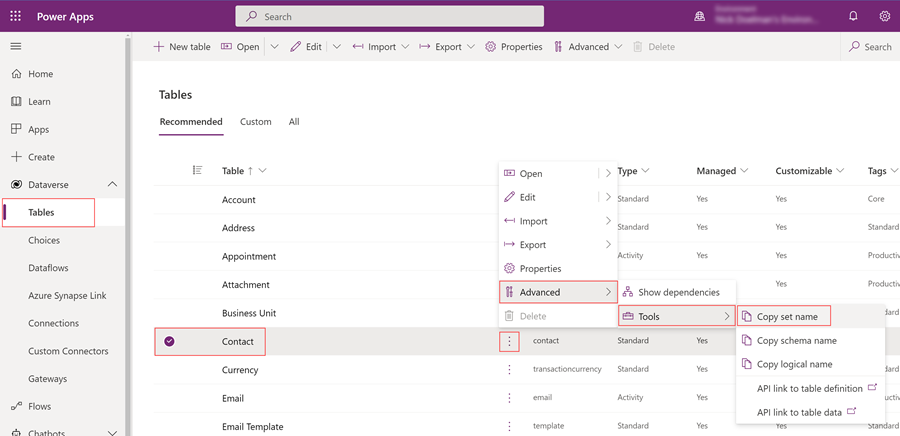
To determine the EntitySetName of specific tables, follow these steps:
Select the Dataverse tab from the side panel and select the table.
Select the ... (Commands option), and then choose Advanced, Tools, and Copy set name to copy the EntitySetName of the table to your clipboard.
Privacy laws and regulations
All request headers use a contact ID for auditing purposes. For an anonymous user, the value is null.
If audit logging is enabled, a user can see all the audit events in the Office 365 audit log.

More information:
Enable and use activity logging
Export, configure, and view audit log records
Unsupported configuration tables
Portals Web API can't be used for the following configuration tables:
adx_contentaccesslevel
adx_contentsnippet
adx_entityform
adx_entityformmetadata
adx_entitylist
adx_entitypermission
adx_entitypermission_webrole
adx_externalidentity
adx_pagealert
adx_pagenotification
adx_pagetag
adx_pagetag_webpage
adx_pagetemplate
adx_portallanguage
adx_publishingstate
adx_publishingstatetransitionrule
adx_publishingstatetransitionrule_webrole
adx_redirect
adx_setting
adx_shortcut
adx_sitemarker
adx_sitesetting
adx_urlhistory
adx_webfile
adx_webfilelog
adx_webform
adx_webformmetadata
adx_webformsession
adx_webformstep
adx_weblink
adx_weblinkset
adx_webnotificationentity
adx_webnotificationurl
adx_webpage
adx_webpage_tag
adx_webpageaccesscontrolrule
adx_webpageaccesscontrolrule_webrole
adx_webpagehistory
adx_webpagelog
adx_webrole_systemuser
adx_website
adx_website_list
adx_website_sponsor
adx_websiteaccess
adx_websiteaccess_webrole
adx_websitebinding
adx_websitelanguage
adx_webtemplate
Known issues
Users get a CDS error if they invoke a GET Web API request for tables that have multiple levels of 1 to many or many to many table permissions when Parental, **Contact, or Account scopes add more conditions to the query.
To resolve this issue, use FetchXML in the OData query.
Next step
Query data using portals Web API