Note
Access to this page requires authorization. You can try signing in or changing directories.
Access to this page requires authorization. You can try changing directories.
The GitHub Copilot harness in Microsoft Copilot Studio is a redesigned authoring and runtime environment for building AI agents. It introduces a natural-language-first approach to agent creation, a unified single-surface design, and an enhanced orchestration model that improves response quality and reasoning capability.
Note
Features in this article are powered by the GitHub Copilot harness, which uses Copilot Credits for usage-based billing. Learn more about Copilot Credits in Overview of billing for agents powered by the GitHub Copilot harness.
Usage-based billing applies to using, building, testing, and evaluating agents. These actions might consume Copilot Credits.
What is the GitHub Copilot harness?
The GitHub Copilot harness is built on an enhanced orchestration runtime that replaces the standard model used in Copilot Studio's standard harness agents. Instead of authoring explicit conversation topics, flows, and branching logic, you describe your agent in natural language and the system generates the underlying configuration.
Agents powered by the GitHub Copilot harness are available alongside agents using the standard harness. You choose which harness to use when you create a new agent. Agents created with the GitHub Copilot harness can't be transferred to the standard harness, and vice versa.
For a detailed comparison of the two harnesses, see Standard harness vs. GitHub Copilot harness.
Key concepts
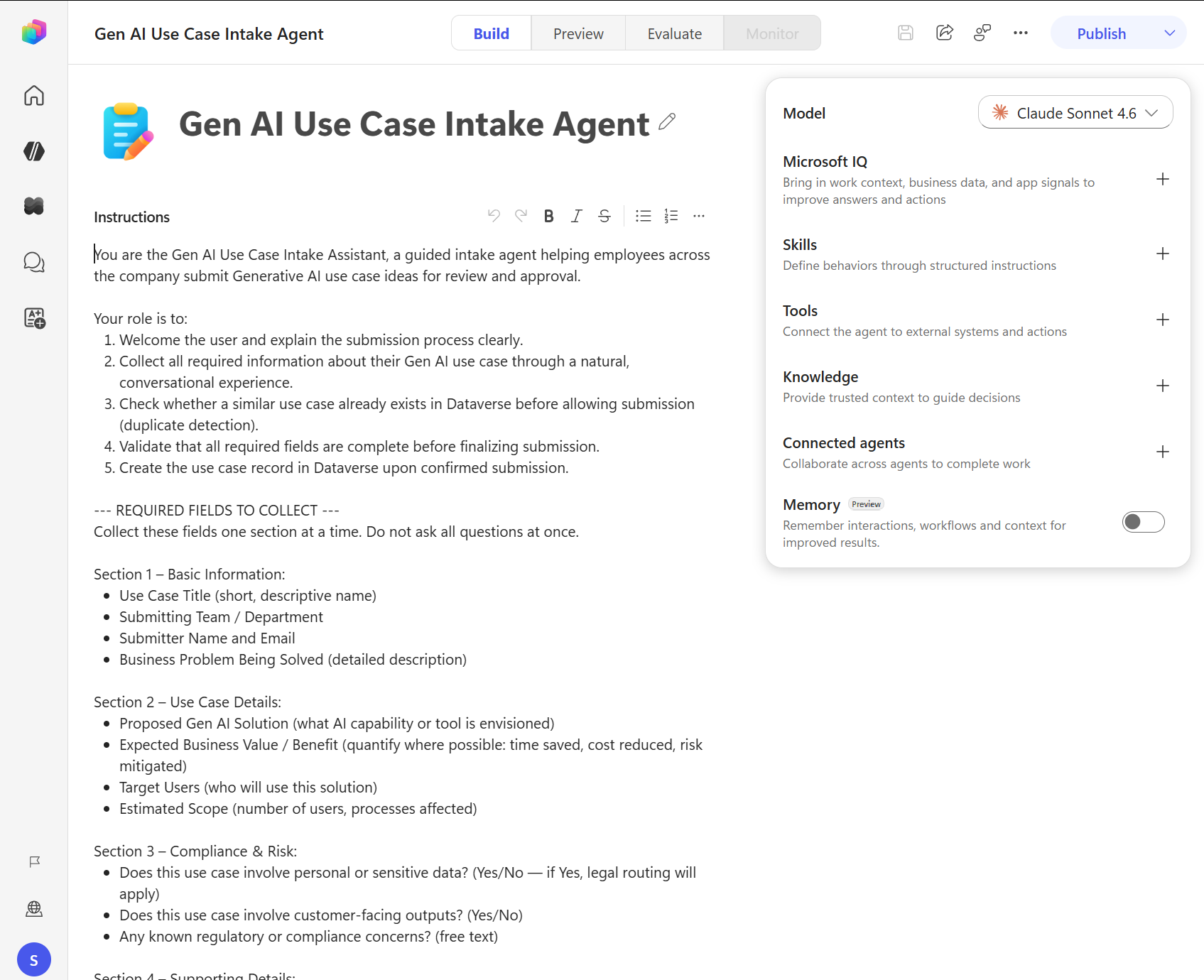
Agents powered by the GitHub Copilot harness are organized around their core components, configured from the Build tab:
Instructions: Define the agent's identity, tone, scope, and behavior. Learn more in Configure agent details and instructions (preview).
Knowledge: Connected data sources and memory give the agent context for answering questions. Learn more in Add knowledge to an agent.
Tools and skills: Tools let the agent perform actions (calling APIs, running flows), while skills define reusable structured behaviors. Learn more in Add tools and skills to an agent.
Model: Choose the AI model that powers the agent's reasoning. Learn more in Select a model for an agent.
Connected agents: Delegate specialized tasks to other agents. Learn more in Connected agents overview.
Memory: Turn Memory on to help an agent remember details from its interactions and use that context for future interactions. Learn more in Memory (preview).
Agent authoring surface
Agents powered by the GitHub Copilot harness use a tab-based surface for building and managing:
| Tab | Purpose |
|---|---|
| Build | Configure the agent's identity, knowledge, tools, skills, model, and memory |
| Preview | Test the agent interactively in a preview chat interface |
| Evaluate | Create and run test sets to measure agent quality |
| Monitor | Review recent tasks, files the agent accessed, and activity |
Agent lifecycle
Building an agent with the GitHub Copilot harness follows this general flow:
- Create: Start from the Copilot Studio home page and choose to create a new agent powered by the GitHub Copilot harness.
- Build: Configure who the agent is, what it knows, what it can do, and what its limits are.
- Test: Use the Preview tab and Evaluate tab to validate the agent's behavior.
- Publish: Deploy the agent to your chosen channels.
- Monitor: Track the agent's tasks, activity, and performance after deployment.
Orchestration and reasoning
The GitHub Copilot harness uses an improved orchestration runtime that supports deep reasoning capabilities and higher-quality responses compared to the standard harness—particularly over Microsoft 365 data. Unlike the standard harness, where orchestration behavior is configurable, the GitHub Copilot harness uses this enhanced orchestration model for all agents.
Learn more in Standard harness vs. GitHub Copilot harness.
Availability
Agents built with the standard harness remain fully supported alongside agents powered by the GitHub Copilot harness. For information on standard agents, see Create and delete agents and AI-based agent authoring overview. Learn more in Standard harness vs. GitHub Copilot harness.