Note
Access to this page requires authorization. You can try signing in or changing directories.
Access to this page requires authorization. You can try changing directories.
This article explains how Git integration for Spark job definitions (SJD) in Microsoft Fabric works. Learn how to set up a repository connection, manage Spark job definition changes through source control, and deploy them across various workspaces.
When you enable Git integration for Spark job definitions in Azure DevOps, you can track changes via the full Git history. If you select PySpark or SparkR, the main definition file and reference file are included as part of the commit. Git integration also tracks changes to the source code within these files.
Important
This feature is in preview.
Set up a connection
From your workspace settings, you can easily set up a connection to your repo to commit and sync changes. To set up the connection, see Get started with Git integration. After you connect, you can see your items, such as Spark job definitions, in the Source control panel.

After you commit the Spark job definition to the Git repo, the job definition folder structure appears in the repository.
Spark job definition representation in Git
The following image shows an example of the file structure for each Spark job definition item in the repo:
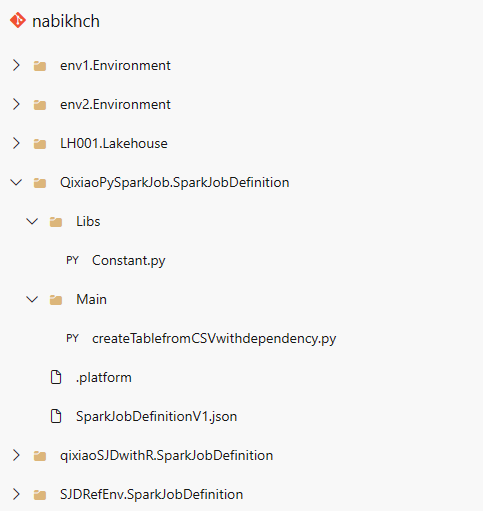
When you commit the Spark job definition item to the repo, a Git folder is created for each item and named according to this schema: <Item name> + "SparkJobDefinition". Don't rename the folder, because it's used to track the item in the workspace. For example, if the item name is "sjd1", the Git folder name is "sjd1SparkJobDefinition".
The Git folder contains two subfolders: main and reference. The main folder contains the main definition file, and the reference folder contains the reference file.
In addition to the main and reference files, there's also a SparkJobDefinitionV1.json file. It holds the metadata for the Spark job definition item, so don't modify it. The .platform file contains the platform information related to Git setup. Don't modify this file either.
Note
- If you choose Java or Scala as the language, the main and reference files aren't committed when uploaded as a .jar file.
- The attached environment persists in a Spark job definition after syncing from the repository to a Fabric workspace. Currently, cross-workspace reference environments aren't supported. You must manually attach to a new environment or use workspace default settings to run the job definition.
- The Spark job definition retains the default lakehouse ID when syncing from the repository to a Fabric workspace. If you commit a notebook with the default lakehouse, you need to manually reference a newly created lakehouse item. For more information, see Lakehouse Git integration.