Note
Access to this page requires authorization. You can try signing in or changing directories.
Access to this page requires authorization. You can try changing directories.
In Dynamics 365 Sales, forecasting gives teams a shared, near real-time view of expected revenue by combining pipeline activity, forecast categories, quotas, and hierarchy rollups. It helps sellers understand whether they are on track, helps managers identify risks early, and helps leadership make faster planning decisions based on current data instead of end-of-period surprises.
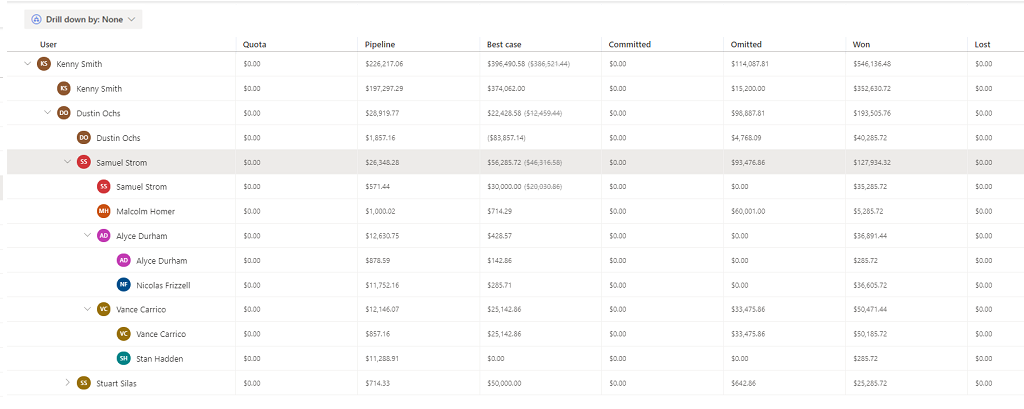
Forecasts are most effective when they're reviewed regularly and used as a planning tool, not just a reporting artifact. By comparing committed revenue, best-case opportunities, and gaps to target, teams can take corrective actions earlier in the cycle. The following screenshot shows an example of a forecast grid with different forecast categories to help sellers and managers understand the health of the pipeline and take action to close gaps:
Tip
Ready to get started? View the out-of-the-box forecast or Set up a forecast in seven steps
Important
This feature is intended to help sales managers or supervisors enhance their team’s performance. This feature isn't intended for use in making, and shouldn't be used to make, decisions that affect the employment of an employee or group of employees, including compensation, rewards, seniority, or other rights or entitlements. Customers are solely responsible for using Dynamics 365, this feature, and any associated feature or service in compliance with all applicable laws, including laws relating to accessing individual employee analytics and monitoring, recording, and storing communications with end users. This also includes adequately notifying end users that their communications with sales persons may be monitored, recorded, or stored and, as required by applicable laws, obtaining consent from end users before using the feature with them. Customers are also encouraged to have a mechanism in place to inform their sales persons that their communications with end users may be monitored, recorded, or stored.
How does a forecast help your sales team
Forecasts give everyone in the organization a shared, data-driven picture of expected revenue. Here's what that means by role:
For Seller: —Track performance against quota, identify pipeline risks before they derail targets, and focus effort on the right deals.
For Managers: — Monitor individual performance, coach sellers on pipeline gaps, and spot risks early enough to take corrective action.
For Directors: — Anticipate departmental revenue trends and reallocate resources to high-opportunity regions or teams.
For Leadership: — Use projected estimates to adjust product strategy or communicate updated projections to investors and stakeholders.
How to set up and use forecasts
To set up and use forecasts, complete the following tasks based on your role:
| User role | Task | Purpose |
|---|---|---|
| Sellers and managers | View the out-of-the-box forecast or activate the sample forecast | Get started immediately without configuration. The out-of-the-box forecast is available for the current month; the sample forecast can be activated without much setup. |
| Forecast owner or admin | Configure a forecast | Define the forecast type, hierarchy, access permissions, and grid columns. |
| Forecast owner or admin | Provide permissions to access and share a forecast | Ensure the right people have access to the forecast data. |
| Sellers and managers | View a forecast | Analyze the forecast data and identify areas of improvement. |
| Managers and supervisors | Adjust values in a forecast | Account for factors that aren't yet captured in the system, such as a verbal commitment from a customer or a deal that paused and is expected to return. |
| Forecast owner | Share a forecast | Give other users in the hierarchy access to the forecast. |