Note
Access to this page requires authorization. You can try signing in or changing directories.
Access to this page requires authorization. You can try changing directories.
The service catalog enables you to quickly deploy tailored Azure Resource Manager (ARM) templates of Azure services into Azure Enclave while staying compliant with policy guardrails and enclave isolation requirements. The service catalog helps you accelerate the creation of your workloads within the secure boundary of Azure Enclave without being impeded by the security controls that protect your environment.
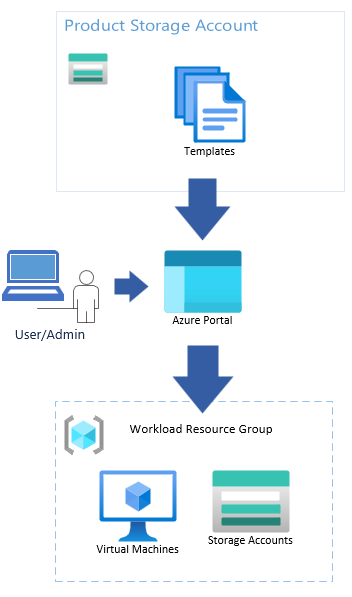
What is in the service catalog?
Browse the Service Catalog List to view the available templates in the service catalog. Review the documentation for each service catalog template you wish to deploy to determine if there are any prerequisite steps.
Note
You can edit the service catalog template itself but edits might change the parameter inputs view.
Service catalog setup
Since Azure Enclave deploys with connections denied by default, you need to create a community endpoint to allow access to the storage account that contains service catalog templates.
{
    endpointRuleName: 'service-catalog'
    destinationType: 'FQDN'
    #disable-next-line no-hardcoded-env-urls
    destination: 'veservicecatalogprod.z22.web.core.windows.net'
    protocols: ['HTTPS']
    ports: '443'
  }
To update the destination for other clouds, use the values in Deploy service catalog templates using Azure CLI.