Note
Access to this page requires authorization. You can try signing in or changing directories.
Access to this page requires authorization. You can try changing directories.
By default, all enclave workloads follow Azure Enclave managed Azure Policy Initiatives detailed in Azure Enclave governance/Governance. This policy set governs all user workloads through Azure Enclave managed Azure Policy Initiative assignments.
For certain enclave owners, this level of governance might be too protective or not protective enough for various reasons. For example, some enclave owners might have regulatory requirements for their workloads to have Public IP addresses, but Azure Enclave governance/Governance policies would block the creation of Public IP addresses for security or compliance reasons.
Currently, this example is expected behavior for governance on a workload. However, if enclave owners require greater flexibility or granularity over their enclave governance, they can manually exempt the Azure Enclave managed Azure Policies. Use native Azure Policy capabilities called Policy exemptions to make these changes. However, enclave owners must specifically modify platform-designed governance behavior on workloads within their enclave.
Overview
First enclave owners must identify which Azure Policy Initiative assignment in their workload needs custom exemption behavior. Policy exemptions allow administrators to exempt a resource hierarchy or an individual resource from evaluation of initiatives or definitions.
Once these Initiative assignments have been identified, enclave owners can create and manage their own Policy Exemptions. For more details on how to perform these steps, learn more on how to Create and manage exemptions
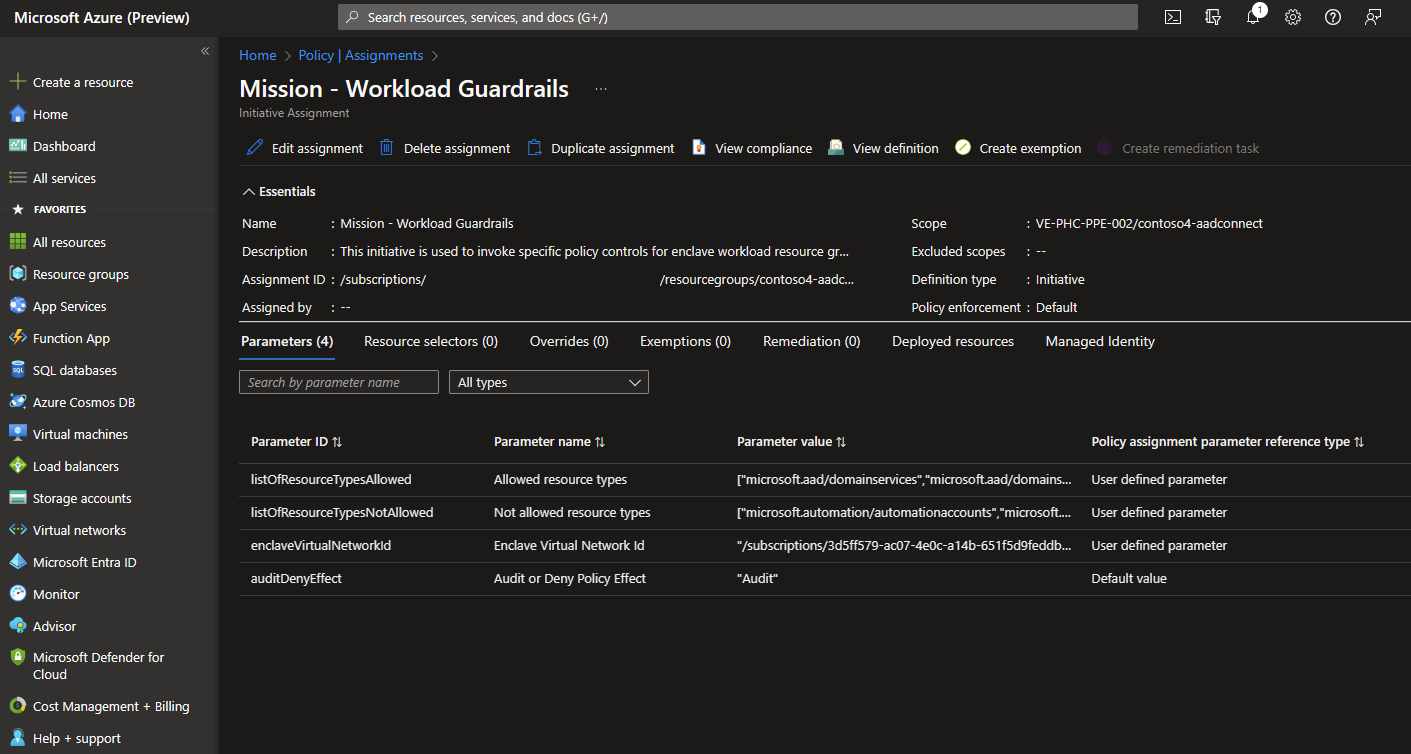
In this image, a Policy initiative assignment within the contoso4-aadconnect workload in the contoso4 Enclave requires an exemption.
Should further troubleshooting be required to investigate Azure Policy exemptions, contact Azure Support.