Note
Access to this page requires authorization. You can try signing in or changing directories.
Access to this page requires authorization. You can try changing directories.
Azure AI Video Indexer enabled by Arc is an Azure Arc extension-enabled service that runs video and audio analysis and generative AI on edge devices. The solution runs on Azure Arc-enabled Kubernetes, supports many video formats, and assumes that one Video Indexer resource maps to one extension. It transcribes spoken content in more than 35 source languages and translates it into English.
For a full list of supported languages, see Supported languages per scenario. If you're new to Azure AI Video Indexer, familiarize yourself with the cloud service first. Before you start working with Azure AI Video Indexer enabled by Arc, review the transparency note to understand usage restrictions.
Important
To successfully deploy the Azure AI Video Indexer extension, your Azure subscription ID must be approved in advance. You must first sign up using the form at Application for gated services.
What is Azure Arc and Azure Arc-enabled Kubernetes?
Azure Arc simplifies governance and management of complex environments that extend across data centers, multiple clouds, and edge by delivering a consistent multicloud and on-premises management platform.
Azure Arc-enabled Kubernetes allows you to attach Kubernetes clusters running anywhere so that you can manage and configure them in Azure. By managing all of your Kubernetes resources in a single control plane, you can enable a more consistent development and operations experience to run cloud-native apps anywhere and on any Kubernetes platform.
When Azure Arc agents are deployed to the cluster, they initiate an outbound connection to Azure by using industry-standard SSL to secure data in transit.
Once clusters are connected to Azure, they're represented as their own resources in Azure Resource Manager (ARM), and they can be organized using resource groups and tagging.
For more information about Azure Arc and Arc-enabled Kubernetes, see Azure Arc overview and What is Azure Arc-enabled Kubernetes?.
What is an Azure Arc extension?
Virtual machine (VM) extensions are small applications that provide post-deployment configuration and automation tasks on Azure VMs. For example, if a virtual machine requires software installation, antivirus protection, or script execution, use a VM extension. For more information about extensions, see Virtual machine extension management with Azure Arc-enabled servers.
The Azure AI Video Indexer extension installs and deploys Azure AI Video Indexer to the Kubernetes cluster.
Azure AI Video Indexer enabled by Arc supports only Azure Resource Manager accounts. Resource Manager operations are decoupled from video insight operations. This design allows you to perform analysis on your edge devices without uploading media assets to Azure.
The extension supports direct connection mode scenarios only. While all processing is performed in the edge environment, control plane information is sent to the cloud for billing and monitoring purposes. New extension versions are downloaded from the cloud. No customer data, such as indexed videos or insights, is sent from the edge location to the cloud.
Language models
The Phi language model is included and automatically connected with your Video Indexer extension. You can start using it immediately. For more information about using language models with Azure AI Video Indexer enabled by Arc, see:
- Use textual summarization
- Use Azure AI Video Indexer to create prompt content
- Azure AI Video Indexer Bring Your Own (BYO) AI model overview
See also the transparency note for textual summarization with Azure AI Video Indexer enabled by Arc for hardware requirements, limitations, and known issues.
Use cases
- Data governance – Bring AI to your content instead of moving content to AI. Use Azure AI Video Indexer enabled by Arc when you can't move indexed content from on-premises to the cloud because of:
- Regulations.
- Architecture decisions.
- Data store being too large, making lift and shift a significant effort.
- On-premises workflow – Your indexing process is part of an on-premises workflow, and you want to reduce indexing latency that affects the flow.
- Pre-indexing – You want to index before uploading the content to the cloud. To create clarity, you can presort your on-premises video or audio archive, and then only upload it for standard or advanced indexing in the cloud.
Example deployment
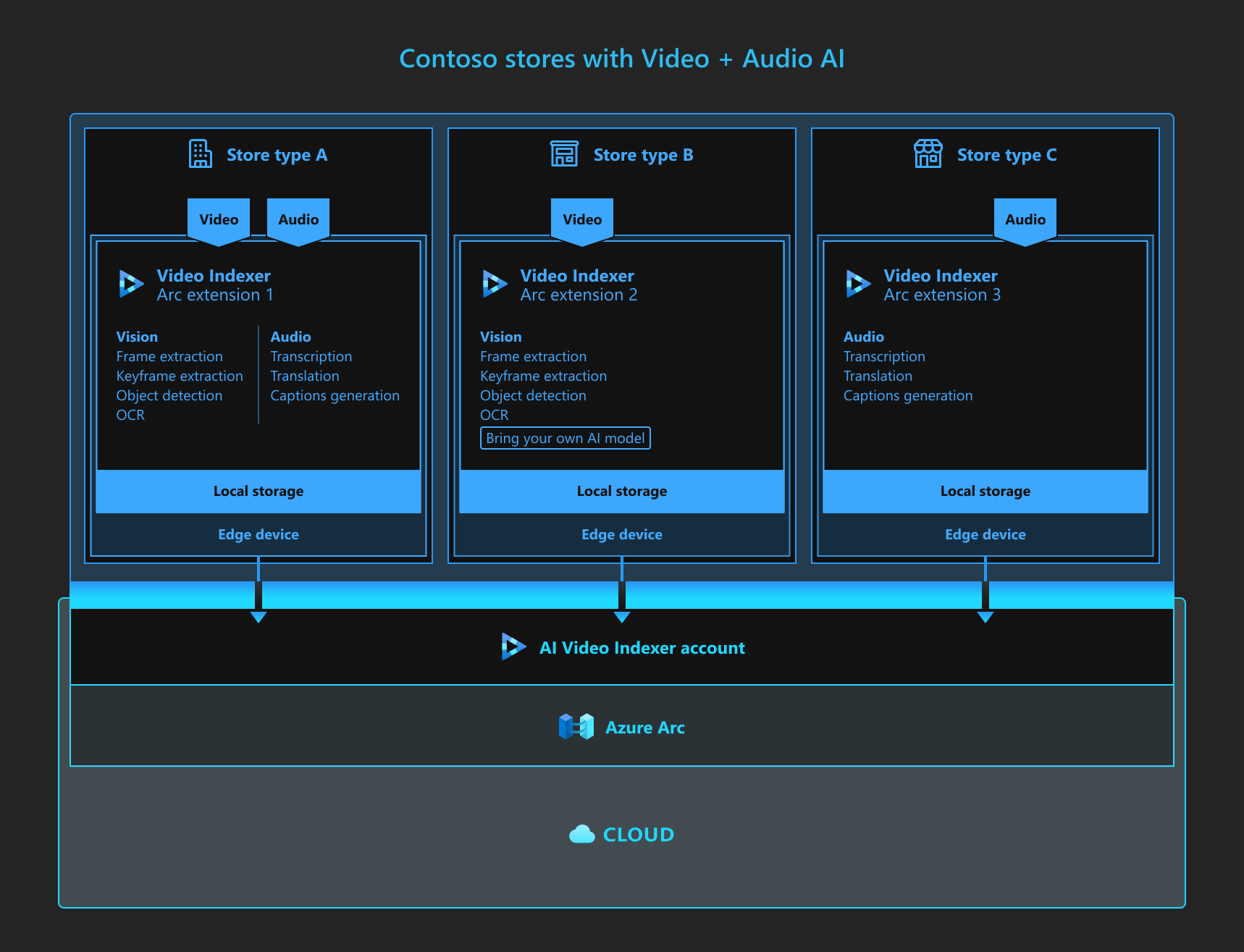
The following diagram shows the Azure AI Video Indexer extension running on Azure Arc. There are three store types:
- Store type A uses both vision and audio presets.
- Store type B uses only vision presets. It also has a custom model. For more information about using a custom model with Azure AI Video Indexer enabled by Arc, see Bring Your Own AI model.
- Store type C uses only audio presets.
The extension is stored on each edge device and each device is associated with a single Azure AI Video Indexer account that interfaces with Azure Arc and the cloud.
Supported AI presets
Azure AI Video Indexer enabled by Arc supports the following indexing presets:
| Model | Basic video | Basic audio | Basic video and audio |
|---|---|---|---|
| Transcription | ✔ | ✔ | |
| Translation | ✔ | ✔ | |
| Captioning | ✔ | ✔ | |
| Key frame detection | ✔ | ✔ | |
| Object detection | ✔ | ✔ | |
| Scene detection | ✔ | ✔ | |
| Shot detection | ✔ | ✔ | |
| Summarization | ✔ | ✔ | ✔ |
Minimum hardware requirements
Video Indexer enabled by Arc is designed to run on any Arc-enabled Kubernetes environment.
Note
The following table covers minimum requirements for a production environment. Use at least a two-node cluster for high availability and scalability. The recommended settings refer to cluster-wide settings. For example, if you have two nodes, each node should have 16 cores and 32 GB of RAM. Create a dedicated node pool or autoscaling group to host the Video Indexer solution.
| Configuration | Virtual machine count | Node CPU cores count | Node RAM | Node storage | Remarks |
|---|---|---|---|---|---|
| Minimum | One | 32 Cores | 64 GB | 50 GB | Storage needs to support ReadWriteMany Storage Class |
| Recommended | Two | 48-64 Cores | 256 GB | 100 GB | Storage needs to support ReadWriteMany Storage Class |
Minimum software requirements
| Component | Minimum requirements |
|---|---|
| Operating system | Ubuntu 22.04 LTS or any Linux-compatible OS |
| Kubernetes | 1.29 |
| Azure CLI | 2.64.0 |
Network requirements
Use the following information to configure firewall settings.
Firewall requirements
Follow the instructions at Azure Arc-enabled Kubernetes network requirements.
In addition, add *.azureedge.net and *.data.microsoft.com.
For the Video Indexer enabled by Arc extension, add these endpoints:
| Endpoint (DNS) | Description |
|---|---|
| linuxgeneva-microsoft.azurecr.io, *.blob.core.windows.net | Used for container registry for telemetry containers |
| *.monitoring.core.windows.net, *.microsoftmetrics.com, *.table.core.windows.net | Used for telemetry |
| api.videoindexer.ai | Used for access token validation |
Summary of required endpoints and ports
Enable the following endpoints and ports.
Azure Arc Services (HTTPS)
- management.azure.com:443
- *.dp.kubernetesconfiguration.azure.com:443
- login.microsoftonline.com:443
- *.login.microsoft.com:443
- login.windows.net:443
- mcr.microsoft.com:443
- *.data.mcr.microsoft.com:443
- dl.k8s.io:443
- gbl.his.arc.azure.com:443
- *.his.arc.azure.com:443
- guestnotificationservice.azure.com:443
- *.guestnotificationservice.azure.com:443
- sts.windows.net:443
- *.servicebus.windows.net:443
- graph.microsoft.com:443
- *.arc.azure.net:443
- linuxgeneva-microsoft.azurecr.io:443
Azure Arc OBO Services (custom HTTPS port)
- *.obo.arc.azure.com:8084
Azure File Storage (SMB)
- STORAGE_ACCOUNT_NAME.file.core.windows.net:139,445
Note
When you use AKS with the Azure Files CSI driver to mount shares as persistent volumes, open ports 139 and 445 for the specific file share.
Telemetry (HTTPS)
- linuxgeneva-microsoft.azurecr.io:443
- *.blob.core.windows.net:443
- gcs.prod.monitoring.core.windows.net:443
- *.microsoftmetrics.com:443
- *.table.core.windows.net:443
- *.azureedge.net:443
- *.data.microsoft.com:443
Video Indexer (HTTPS)
- api.videoindexer.ai:443
Supported input formats and codecs
The following section lists the supported input formats and codecs for Azure AI Video Indexer enabled by Arc.
Video formats
- AVI (.avi)
- FLV (with H.264 and AAC codecs) (.flv)
- ISMV (.isma, .ismv)
- Matroska (.mkv)
- MP4 (.mp4, .m4a, .m4v)
- MXF (.mxf)
- MPEG2-TS
- QuickTime (.mov)
- WAVE/WAV (.wav)
- Windows Media Video (WMV)/ASF (.wmv, .asf)
Video codecs
- AVC 8-bit/10-bit, up to 4:2:2, including AVCIntra
- Digital video (DV) (in AVI files)
- DVCPro/DVCProHD (in MXF container)
- HEVC/H.265
- MPEG-1
- MPEG-2 (up to 422 Profile and High Level; including variants such as Sony XDCAM, Sony XDCAM HD, Sony XDCAM IMX, CableLabs®, and D10)
- MPEG-4 Part 2
- VC-1/WMV9
Audio codecs up to two tracks
- AAC (AAC-LC, AAC-HE, and AAC-HEv2)
- FLAC
- MPEG Layer 2
- MP3 (MPEG-1 Audio Layer 3)
- VORBIS
- WAV/PCM
- Windows Media Audio
Bring your own model
Azure AI Video Indexer enabled by Arc also supports bringing your own model. For more information, see the Bring Your Own Model (BYO) article.
Limitations
- The supported file size for indexing is up to 2 GB.
- Azure AI Video Indexer enabled by Arc doesn't support uploading and indexing videos with a resolution of 1920 x 1080 or greater.
- Upgrading the extension:
- Extension support applies to the latest version only.
- Set the
auto-upgradeproperty totrueto keep the extension up to date. - If you set the auto-upgrade property to
false, upgrade versions incrementally. Jumping between versions can cause indexing processes to fail.
- After extension installation or upgrade, the first indexing or translation process takes longer than normal. This delay occurs because the process downloads AI model images. The duration varies based on network speed.
- You can deploy only one Video Indexer extension per Arc-enabled Kubernetes cluster.
- The cluster's volume performance (based on storage class) has a significant effect on indexing job turnaround time, especially because frame extraction writes all frames to the volume.
- Only extension access tokens are supported. You can obtain extension access tokens from API or CLI. For
get-access-tokensamples, see How to access the extension. - Memory limitations prevent storing video error messages.
Azure Container Storage enabled by Arc
We recommend that you use Azure Container Storage enabled by Azure Arc for storage. For more information, see the following articles:
Related content
- Try the Azure AI Video Indexer enabled by Arc sample on GitHub.
- Try the Azure AI Video Indexer enabled by Arc Jumpstart.
- Try deploying in the Azure portal using the Azure AI Video Indexer enabled by Arc quickstart