Note
Access to this page requires authorization. You can try signing in or changing directories.
Access to this page requires authorization. You can try changing directories.
When it comes to consuming configuration, client applications have different requirements than server applications. They can't store secrets, they operate on a much larger scale, and users expect instant startup times from anywhere in the world. To meet the requirements of client-side application configuration, Azure App Configuration provides integration with Azure Front Door. Azure Front Door's edge-based content delivery network combined with Azure App Configuration's centralized configuration management enables client applications anywhere to get configuration fast, reliably and anonymously.
CDN-accelerated configuration delivery with Azure Front Door
App Configuration gives developers a single, consistent place to define configuration settings and feature flags. By integrating Azure App Configuration with Azure Front Door, your configuration data is centrally managed through Azure App Configuration while being cached and distributed through Azure's content delivery network. This architecture is valuable for client-facing applications including mobile, desktop, and browser-based applications.
System architecture
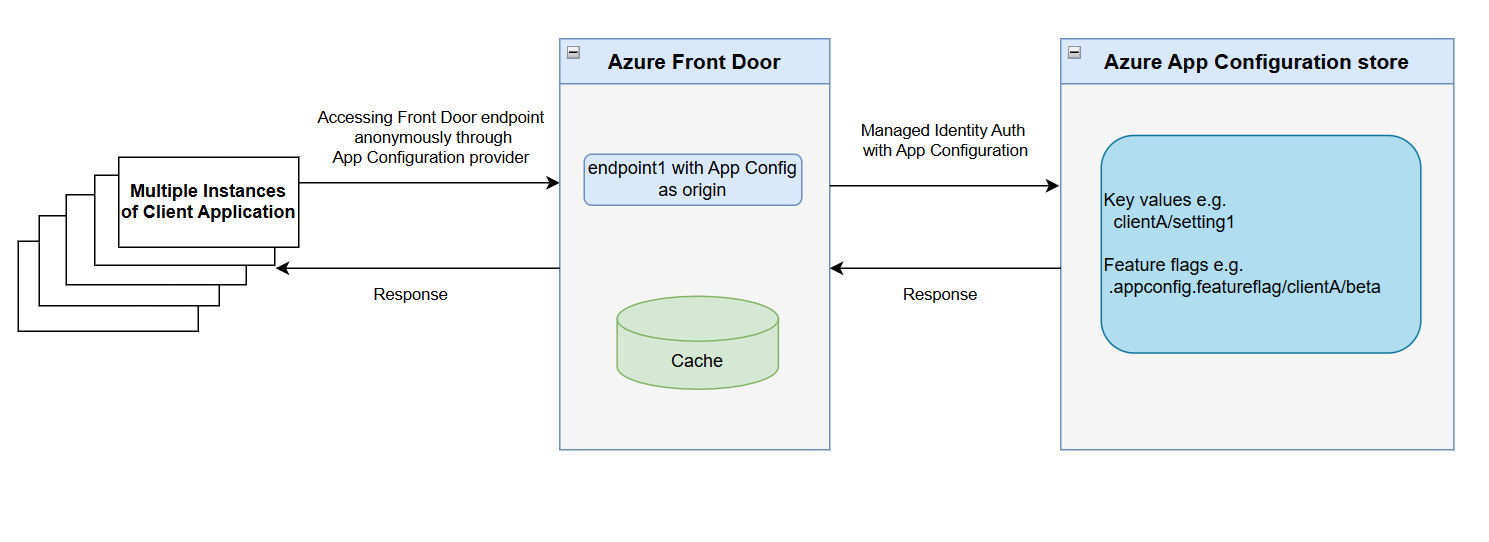
How it works
- Client applications retrieve configuration through Azure Front Door endpoints without authentication, eliminating the security risk of embedding credentials in client-side code.
- Azure Front Door uses Managed Identity to authenticate with Azure App Configuration securely.
- Edge caching enables high throughput and low latency configuration delivery.
This architecture eliminates the need for custom proxies or gateways while providing secure, efficient configuration delivery to client applications.
Developer scenarios
CDN-delivered configuration unlocks a range of client application scenarios:
- Client-side feature rollouts for UI components
- A/B testing or targeted experiences using feature flags
- Control AI/LLM model parameters and UI behaviors through configuration
- Dynamically control client-side agent behavior, safety modes, and guardrail settings through configuration
- Consistent behavior for clients using snapshot-based configuration
Note
This feature is currently available only in the Azure public cloud.
Recommendations and considerations
Security
Configuration exposed through Azure Front Door is publicly accessible without authentication, making proper security controls essential. Implement the following strategies to protect your configuration data from unintended exposure.
Use a dedicated App Configuration store
Use a dedicated App Configuration store for client-facing configuration delivered through Azure Front Door. This store should contain only nonsensitive settings that are safe for public consumption. This isolation strategy limits potential impact if configuration is inadvertently exposed, ensuring that sensitive data remains protected.
Role Based Access Control using Managed Identity
Azure Front Door accesses App Configuration data using either a system-assigned managed identity or a user-assigned managed identity. Restrict the managed identity to the App Configuration Data Reader role only and avoid assigning any roles with write permissions.
Failover and load balancing
Client applications rely on Azure Front Door for failover and load balancing, as they don't connect directly to App Configuration. To enable automatic failover and geo-redundant configuration delivery, configure your App Configuration replicas as origins in the Azure Front Door endpoint. For details on how origin groups improve availability and performance, see Azure Front Door routing methods
Caching
Configure Azure Front Door cache duration to balance configuration freshness and origin load. Azure Front Door controls the caching behavior, which means updates from App Configuration can only be seen by your application after the Front Door cache expires. This cache expiration time effectively becomes the minimum time before your app can observe new configuration values, regardless of how frequently the app checks for changes.
We recommend setting Azure Front Door cache TTL to at least 10 minutes and application refresh interval to at least 1 minute. With these settings, configuration updates may take up to 11 minutes to propagate: Azure Front Door 10 minute cache TTL plus up to 1 minute until the next application refresh.
You can choose appropriate refresh interval values that fit your application. Shorter cache durations will increase the number of requests routed through Azure Front Door. This model provides eventual consistency, not real-time propagation, which is expected for CDN-based delivery. Learn more about Caching with Azure Front Door.
Note
Azure Front Door makes no guarantees about the amount of time that the content is stored in the cache. Cached content may be removed from the edge cache before the content expiration if the content isn't frequently used. Additionally, if App Configuration is unreachable, Azure Front Door may continue serving stale data from cache to maintain application availability.