Note
Access to this page requires authorization. You can try signing in or changing directories.
Access to this page requires authorization. You can try changing directories.
The UA Cloud Library is a standardized, Internet-hosted (by the OPC Foundation) repository for OPC UA information models. It was developed by a joint working group of the OPC Foundation and CESMII to make OPC UA models globally discoverable, reusable, and accessible via web APIs.
Core concept
It is essentially an online database ("store") of OPC UA AddressSpaces / namespaces / information models. The library is hosted in the cloud and accessible over the Internet. A mandatory RESTful interface allows clients to upload models, download models and query/search models. This eliminates the traditional dependency on a live OPC UA server to discover its data model.
The problem it solves
In classic OPC UA usage: A client must connect to a running server and browse its AddressSpace to understand the structure. Final configuration of clients is only possible when the machine is online.
The UA Cloud Library changes that by:
- Providing the model ahead of time, independently of device availability
- Enabling offline engineering and pre-configuration at global scale
What is stored:
- Standardized information models (e.g., Companion Specifications)
- Vendor-specific or machine-specific models
- Partial AddressSpaces (useful subsets rather than full server instances)
Each entry is identified using globally unique identifiers NamespaceURI, Version and PublicationDate.
Architecture and access
Defined in the OPC UA specification series OPC 30400:
Part 1: architecture and use cases
Part 2: API definition
It uses REST + query language for search/retrieval, as well as a separate identity provider for access control.
There is also a public instance operated by the OPC Foundation and a reference implementation (open source).
Key use cases
- Pre-configuring OPC UA clients (SCADA, analytics, digital twins) before connecting to machines
- Interoperability validation / conformance checking of devices
- Retrofitting legacy machines by assigning or reusing models
- Deploying AddressSpaces into servers (e.g., loading models into an empty/server wrapper)
- Global sharing of industry models across vendors and ecosystems
- It acts as a neutral distribution mechanism for information models
- It decouples protocol/runtime discovery from information model lifecycle and governance
- It supports cross-organization reuse, which is critical for Companion Specs and Digital Product Passport scenarios
It is moving OPC UA closer to a "model-driven ecosystem with cloud-native discovery", rather than purely runtime coupling.
Import OPC UA Information Models from the UA Cloud Library into Azure Data Explorer
To read OPC UA Information Models directly from Azure Data Explorer, import the OPC UA nodes defined in an OPC UA Information Model into a table. You can use the imported information for lookup of more metadata within queries.
First, configure an Azure Data Explorer callout policy for the UA Cloud Library by running the following query on your Azure Data Explorer cluster. Before you start, make sure you're a member of the AllDatabasesAdmin role in the cluster. You can configure this role in the Azure portal by navigating to the Permissions page for your Azure Data Explorer cluster.
.alter-merge cluster policy callout @'[{"CalloutType": "webapi","CalloutUriRegex": "uacloudlibrary\\.opcfoundation\\.org/?$","CanCall": true}]'
Then, run the following Azure Data Explorer query from the Azure portal. In the query:
- Replace
<INFORMATION_MODEL_IDENTIFIER_FROM_THE_UA_CLOUD_LIBRARY>with the unique ID of the Information Model you want to import from the UA Cloud Library. You can find this ID in the URL of the Information Model's page in the UA Cloud Library. For example, the ID of the station nodeset that this tutorial uses is1627266626. - Replace
<HASHED_CLOUD_LIBRARY_CREDENTIALS>with a basic authorization header hash of your UA Cloud Library credentials. Use a tool such as Basic Auth Header Generator to generate the hash. You can also use the following bash command:echo -n 'username:password' | base64.
let uri='https://uacloudlibrary.opcfoundation.org/infomodel/download/<INFORMATION_MODEL_IDENTIFIER_FROM_THE_UA_CLOUD_LIBRARY>';
let headers=dynamic({'accept':'text/plain', 'Authorization':'Basic <HASHED_CLOUD_LIBRARY_CREDENTIALS>'});
evaluate http_request(uri, headers)
| project title = tostring(ResponseBody.['title']), contributor = tostring(ResponseBody.contributor.name), nodeset = parse_xml(tostring(ResponseBody.nodeset.nodesetXml))
| mv-expand UAVariable=nodeset.UANodeSet.UAVariable
| project-away nodeset
| extend NodeId = UAVariable.['@NodeId'], DisplayName = tostring(coalesce(UAVariable.DisplayName.['#text'], UAVariable.DisplayName)), BrowseName = tostring(UAVariable.['@BrowseName']), DataType = tostring(UAVariable.['@DataType'])
| project-away UAVariable
| take 10000
Make the model's variables visible in the OPC UA tables
Instead of keeping the imported model in a separate table, you can add its variables directly to the standard opcua_metadata and opcua_telemetry tables. Each variable is written with a placeholder telemetry value of [Future], so users can see all the variables that could be retrieved from that OPC UA server's information model, alongside the ones that are actually being published live. Both tables are created automatically on the first run.
First, add every variable of the Information Model to opcua_metadata so they show up as known nodes:
.set-or-append opcua_metadata <|
let uri='https://uacloudlibrary.opcfoundation.org/infomodel/download/<INFORMATION_MODEL_IDENTIFIER_FROM_THE_UA_CLOUD_LIBRARY>';
let headers=dynamic({'accept':'text/plain', 'Authorization':'Basic <HASHED_CLOUD_LIBRARY_CREDENTIALS>'});
evaluate http_request(uri, headers)
| project title = tostring(ResponseBody.['title']), nodeset = parse_xml(tostring(ResponseBody.nodeset.nodesetXml))
| extend ModelNamespaceUri = tostring(nodeset.UANodeSet.NamespaceUris.Uri)
| mv-expand UAVariable = nodeset.UANodeSet.UAVariable
| extend NodeId = tostring(UAVariable.['@NodeId']), DisplayName = tostring(coalesce(UAVariable.DisplayName.['#text'], UAVariable.DisplayName)), DataType = tostring(UAVariable.['@DataType'])
| where isnotempty(DisplayName)
| project
    Subject = NodeId,
    Timestamp = now(),
    DataSetName = ['title'],
    MajorVersion = tolong(0),
    MinorVersion = tolong(0),
    Name = DisplayName,
    BuiltInType = toint(0),
    DataType = DataType,
    ValueRank = toint(-1),
    Type = '',
    DisplayName = DisplayName,
    Workcell = ['title'],
    Line = '[Future]',
    Area = '[Future]',
    Site = '[Future]',
    Enterprise = 'UA Cloud Library',
    NamespaceUri = ModelNamespaceUri,
    NodeId = NodeId
Then add a placeholder row per variable to opcua_telemetry with the value set to [Future]:
.set-or-append opcua_telemetry <|
let uri='https://uacloudlibrary.opcfoundation.org/infomodel/download/<INFORMATION_MODEL_IDENTIFIER_FROM_THE_UA_CLOUD_LIBRARY>';
let headers=dynamic({'accept':'text/plain', 'Authorization':'Basic <HASHED_CLOUD_LIBRARY_CREDENTIALS>'});
evaluate http_request(uri, headers)
| project nodeset = parse_xml(tostring(ResponseBody.nodeset.nodesetXml))
| mv-expand UAVariable = nodeset.UANodeSet.UAVariable
| extend NodeId = tostring(UAVariable.['@NodeId']), DisplayName = tostring(coalesce(UAVariable.DisplayName.['#text'], UAVariable.DisplayName))
| where isnotempty(DisplayName)
| project
    Subject = NodeId,
    Timestamp = now(),
    Name = DisplayName,
    Value = dynamic("[Future]")
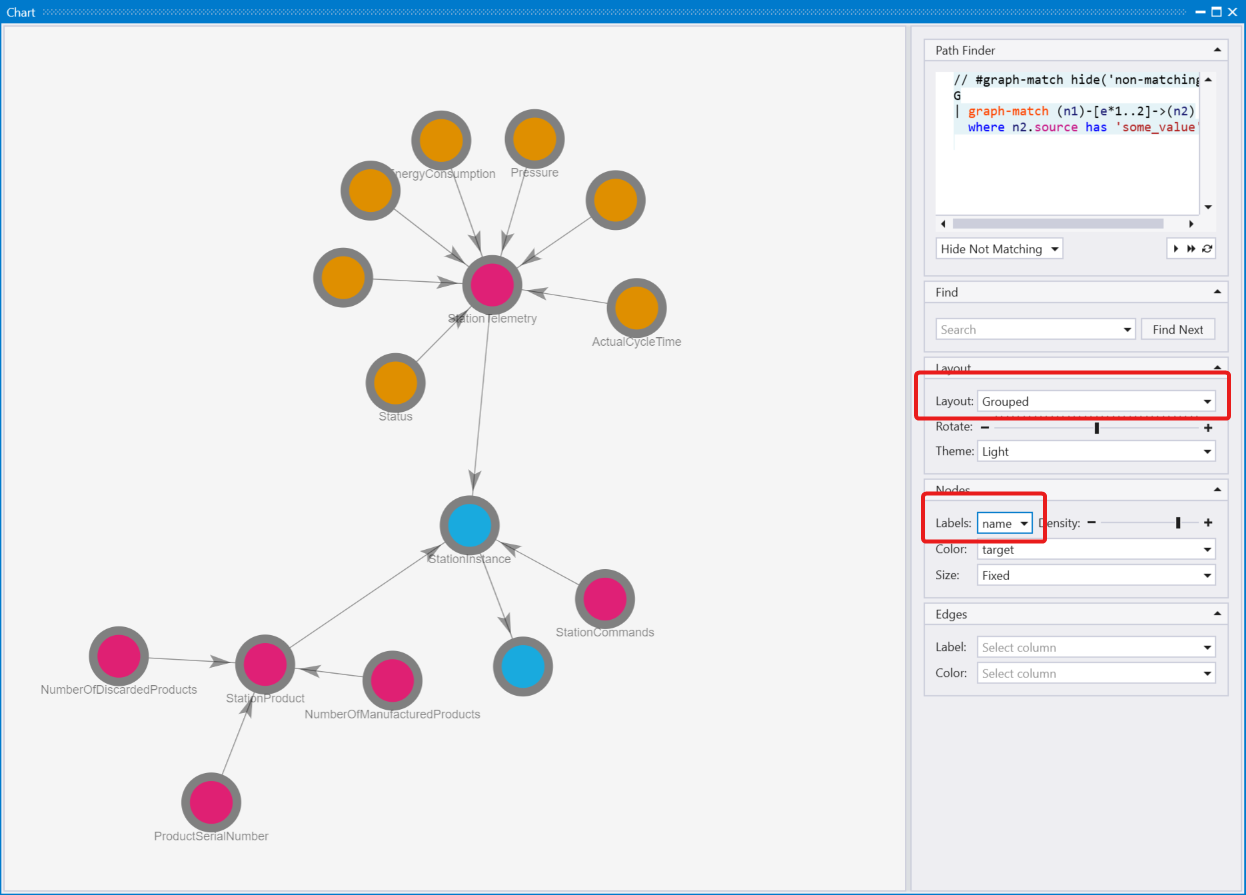
To view a graphical representation of an OPC UA Information Model, use the Kusto Explorer tool. To render station model, run the following query in Kusto Explorer. For best results, change the Layout option to Grouped and the Labels to name:
let uri='https://uacloudlibrary.opcfoundation.org/infomodel/download/1627266626';
let headers=dynamic({'accept':'text/plain', 'Authorization':'Basic <HASHED_CLOUD_LIBRARY_CREDENTIALS>'});
let variables = evaluate http_request(uri, headers)
    | project title = tostring(ResponseBody.['title']), contributor = tostring(ResponseBody.contributor.name), nodeset = parse_xml(tostring(ResponseBody.nodeset.nodesetXml))
    | mv-expand UAVariable = nodeset.UANodeSet.UAVariable
    | extend NodeId = UAVariable.['@NodeId'], ParentNodeId = UAVariable.['@ParentNodeId'], DisplayName = tostring(UAVariable['DisplayName']), DataType = tostring(UAVariable.['@DataType']), References = tostring(UAVariable.['References'])
    | where References !contains "HasModellingRule"
    | where DisplayName != "InputArguments"
    | project-away nodeset, UAVariable, References;
let objects = evaluate http_request(uri, headers)
    | project title = tostring(ResponseBody.['title']), contributor = tostring(ResponseBody.contributor.name), nodeset = parse_xml(tostring(ResponseBody.nodeset.nodesetXml))
    | mv-expand UAObject = nodeset.UANodeSet.UAObject
    | extend NodeId = UAObject.['@NodeId'], ParentNodeId = UAObject.['@ParentNodeId'], DisplayName = tostring(UAObject['DisplayName']), References = tostring(UAObject.['References'])
    | where References !contains "HasModellingRule"
    | project-away nodeset, UAObject, References;
let nodes = variables
    | project source = tostring(NodeId), target = tostring(ParentNodeId), name = tostring(DisplayName)
    | join kind=fullouter (objects
        | project source = tostring(NodeId), target = tostring(ParentNodeId), name = tostring(DisplayName)) on source
        | project source = coalesce(source, source1), target = coalesce(target, target1), name = coalesce(name, name1);
let edges = nodes;
edges
    | make-graph source --> target with nodes on source
Import OPC UA Information Models from the UA Cloud Library into Fabric
You can import entire OPC UA Information Models into your Eventhouse from the UA Cloud Library, an online store of OPC UA Information Models hosted by the OPC Foundation. Importing the OPC UA nodes defined in an Information Model into a table lets you look up richer semantics within your queries, including the full model hierarchy, complex type definitions and all available telemetry from your sites.
Because the Fabric Eventhouse KQL engine supports the http_request plugin, the queries below work in Fabric exactly like they do in ADX.
Register and find an Information Model
- Register for free at the UA Cloud Library: https://uacloudlibrary.opcfoundation.org/Identity/Account/Register.
- Browse the available Information Models at https://uacloudlibrary.opcfoundation.org/Explorer and note the unique ID of the model you want to import. You can find this ID in the URL of the model's page. For example, the
Stationnodeset used by this reference solution has the ID1627266626. - Create a basic authorization header from your UA Cloud Library credentials. Generate the Base64 hash with the bash command
echo -n 'username:password' | base64, or use a tool such as https://www.debugbear.com/basic-auth-header-generator.
Enable the http_request plugin and allow the UA Cloud Library endpoint
Unlike Azure Data Explorer, a Fabric Eventhouse has the http_request plugin disabled by default, so it must be enabled first. In your KQL database, click Explore your data and run the following commands (you need database admin permissions):
// Enable the http_request plugin used to call the UA Cloud Library REST API
.enable plugin http_request

// Allow Kusto to call the UA Cloud Library endpoint
.alter cluster policy callout @'[{"CalloutType": "webapi","CalloutUriRegex": "uacloudlibrary.opcfoundation.org","CanCall": true}]'
Import an Information Model
Run the following query to download an Information Model from the UA Cloud Library and expand its variable nodes. Replace <INFORMATION_MODEL_IDENTIFIER_FROM_THE_UA_CLOUD_LIBRARY> with the model's unique ID (for example 1627266626) and <HASHED_CLOUD_LIBRARY_CREDENTIALS> with your Base64-encoded credentials:
let uri='https://uacloudlibrary.opcfoundation.org/infomodel/download/<INFORMATION_MODEL_IDENTIFIER_FROM_THE_UA_CLOUD_LIBRARY>';
let headers=dynamic({'accept':'text/plain', 'Authorization':'Basic <HASHED_CLOUD_LIBRARY_CREDENTIALS>'});
evaluate http_request(uri, headers)
| project title = tostring(ResponseBody.['title']), contributor = tostring(ResponseBody.contributor.name), nodeset = parse_xml(tostring(ResponseBody.nodeset.nodesetXml))
| mv-expand UAVariable=nodeset.UANodeSet.UAVariable
| project-away nodeset
| extend NodeId = UAVariable.['@NodeId'], DisplayName = tostring(coalesce(UAVariable.DisplayName.['#text'], UAVariable.DisplayName)), BrowseName = tostring(UAVariable.['@BrowseName']), DataType = tostring(UAVariable.['@DataType'])
| project-away UAVariable
| take 10000
To persist the imported model into a table (for example opcua_information_model) so you can join it with your opcua_telemetry and opcua_metadata tables, wrap the same query with .set-or-append. The table is created automatically on the first run:
.set-or-append opcua_information_model <|
let uri='https://uacloudlibrary.opcfoundation.org/infomodel/download/<INFORMATION_MODEL_IDENTIFIER_FROM_THE_UA_CLOUD_LIBRARY>';
let headers=dynamic({'accept':'text/plain', 'Authorization':'Basic <HASHED_CLOUD_LIBRARY_CREDENTIALS>'});
evaluate http_request(uri, headers)
| project title = tostring(ResponseBody.['title']), contributor = tostring(ResponseBody.contributor.name), nodeset = parse_xml(tostring(ResponseBody.nodeset.nodesetXml))
| mv-expand UAVariable=nodeset.UANodeSet.UAVariable
| extend NodeId = tostring(UAVariable.['@NodeId']), DisplayName = tostring(coalesce(UAVariable.DisplayName.['#text'], UAVariable.DisplayName)), BrowseName = tostring(UAVariable.['@BrowseName']), DataType = tostring(UAVariable.['@DataType'])
| project title, contributor, NodeId, DisplayName, BrowseName, DataType
| take 10000
Make the model's variables visible in the OPC UA tables
Just like in Azure Data Explorer, you can add the imported model's variables directly to the standard opcua_metadata and opcua_telemetry tables of your Eventhouse instead of keeping them in a separate table. Each variable is written with a placeholder telemetry value of [Future], so users can see all the variables that could be retrieved from that OPC UA server's information model, alongside the ones that are actually being published live.
First, add every variable of the Information Model to opcua_metadata:
.set-or-append opcua_metadata <|
let uri='https://uacloudlibrary.opcfoundation.org/infomodel/download/<INFORMATION_MODEL_IDENTIFIER_FROM_THE_UA_CLOUD_LIBRARY>';
let headers=dynamic({'accept':'text/plain', 'Authorization':'Basic <HASHED_CLOUD_LIBRARY_CREDENTIALS>'});
evaluate http_request(uri, headers)
| project title = tostring(ResponseBody.['title']), nodeset = parse_xml(tostring(ResponseBody.nodeset.nodesetXml))
| extend ModelNamespaceUri = tostring(nodeset.UANodeSet.NamespaceUris.Uri)
| mv-expand UAVariable = nodeset.UANodeSet.UAVariable
| extend NodeId = tostring(UAVariable.['@NodeId']), DisplayName = tostring(coalesce(UAVariable.DisplayName.['#text'], UAVariable.DisplayName)), DataType = tostring(UAVariable.['@DataType'])
| where isnotempty(DisplayName)
| project
    Subject = NodeId,
    Timestamp = now(),
    DataSetName = ['title'],
    MajorVersion = tolong(0),
    MinorVersion = tolong(0),
    Name = DisplayName,
    BuiltInType = toint(0),
    DataType = DataType,
    ValueRank = toint(-1),
    Type = '',
    DisplayName = DisplayName,
    Workcell = ['title'],
    Line = '[Future]',
    Area = '[Future]',
    Site = '[Future]',
    Enterprise = 'UA Cloud Library',
    NamespaceUri = ModelNamespaceUri,
    NodeId = NodeId
Then add a placeholder row per variable to opcua_telemetry with the value set to [Future]:
.set-or-append opcua_telemetry <|
let uri='https://uacloudlibrary.opcfoundation.org/infomodel/download/<INFORMATION_MODEL_IDENTIFIER_FROM_THE_UA_CLOUD_LIBRARY>';
let headers=dynamic({'accept':'text/plain', 'Authorization':'Basic <HASHED_CLOUD_LIBRARY_CREDENTIALS>'});
evaluate http_request(uri, headers)
| project nodeset = parse_xml(tostring(ResponseBody.nodeset.nodesetXml))
| mv-expand UAVariable = nodeset.UANodeSet.UAVariable
| extend NodeId = tostring(UAVariable.['@NodeId']), DisplayName = tostring(coalesce(UAVariable.DisplayName.['#text'], UAVariable.DisplayName))
| where isnotempty(DisplayName)
| project
    Subject = NodeId,
    Timestamp = now(),
    Name = DisplayName,
    Value = dynamic("[Future]")
Visualize an Information Model as a graph
To view a graphical representation of an OPC UA Information Model, run the following query and switch the result view to Graph. For best results, set the Layout option to Grouped and the Labels to name:
let uri='https://uacloudlibrary.opcfoundation.org/infomodel/download/1627266626';
let headers=dynamic({'accept':'text/plain', 'Authorization':'Basic <HASHED_CLOUD_LIBRARY_CREDENTIALS>'});
let variables = evaluate http_request(uri, headers)
    | project title = tostring(ResponseBody.['title']), contributor = tostring(ResponseBody.contributor.name), nodeset = parse_xml(tostring(ResponseBody.nodeset.nodesetXml))
    | mv-expand UAVariable = nodeset.UANodeSet.UAVariable
    | extend NodeId = UAVariable.['@NodeId'], ParentNodeId = UAVariable.['@ParentNodeId'], DisplayName = tostring(UAVariable['DisplayName']), DataType = tostring(UAVariable.['@DataType']), References = tostring(UAVariable.['References'])
    | where References !contains "HasModellingRule"
    | where DisplayName != "InputArguments"
    | project-away nodeset, UAVariable, References;
let objects = evaluate http_request(uri, headers)
    | project title = tostring(ResponseBody.['title']), contributor = tostring(ResponseBody.contributor.name), nodeset = parse_xml(tostring(ResponseBody.nodeset.nodesetXml))
    | mv-expand UAObject = nodeset.UANodeSet.UAObject
    | extend NodeId = UAObject.['@NodeId'], ParentNodeId = UAObject.['@ParentNodeId'], DisplayName = tostring(UAObject['DisplayName']), References = tostring(UAObject.['References'])
    | where References !contains "HasModellingRule"
    | project-away nodeset, UAObject, References;
let nodes = variables
    | project source = tostring(NodeId), target = tostring(ParentNodeId), name = tostring(DisplayName)
    | join kind=fullouter (objects
        | project source = tostring(NodeId), target = tostring(ParentNodeId), name = tostring(DisplayName)) on source
        | project source = coalesce(source, source1), target = coalesce(target, target1), name = coalesce(name, name1);
let edges = nodes;
edges
| make-graph source --> target with nodes on source
Import OPC UA Information Models from the UA Cloud Library into Databricks
Many customers want to import entire OPC UA Information Models into their analytics platform from the UA Cloud Library. This provides richer semantics beyond what OPC UA PubSub metadata alone can offer, including:
- Full Information Model context - not just the published data points, but the entire model hierarchy
- Complex type definitions and references to other data needed for deeper analysis
- Visibility into all available telemetry from your sites, enabling informed decisions about what to publish to the cloud
Register and browse
- Register for free: https://uacloudlibrary.opcfoundation.org/Identity/Account/Register
- Browse available Information Models: https://uacloudlibrary.opcfoundation.org/Explorer
- Find the unique ID via the REST API: https://uacloudlibrary.opcfoundation.org/infomodel/namespaces
- For example, the "Robotics" Information Model has the unique ID
4172981173.
- For example, the "Robotics" Information Model has the unique ID
Import an Information Model into Databricks
In Azure Data Explorer, this was done using the evaluate http_request() operator. In Databricks, you can use a PySpark notebook with the requests library:
import requests
import base64
import xml.etree.ElementTree as ET
from pyspark.sql import Row

# --- Configuration ---
CLOUD_LIBRARY_USERNAME = "<your-cloud-library-username>"
CLOUD_LIBRARY_PASSWORD = "<your-cloud-library-password>"
INFORMATION_MODEL_ID = "4172981173"  # e.g., Robotics

# --- Download the Information Model ---
url = f"https://uacloudlibrary.opcfoundation.org/infomodel/download/{INFORMATION_MODEL_ID}"
credentials = base64.b64encode(
    f"{CLOUD_LIBRARY_USERNAME}:{CLOUD_LIBRARY_PASSWORD}".encode()
).decode()

headers = {
    "Accept": "text/plain",
    "Authorization": f"Basic {credentials}"
}

response = requests.get(url, headers=headers)
response.raise_for_status()
model_data = response.json()

# --- Extract metadata ---
title = model_data.get("title", "")
contributor = model_data.get("contributor", {}).get("name", "")
nodeset_xml = model_data.get("nodeset", {}).get("nodesetXml", "")

# --- Parse the OPC UA Nodeset XML ---
root = ET.fromstring(nodeset_xml)
ns = {"ua": "http://opcfoundation.org/UA/2011/03/UANodeSet.xsd"}

# The model's own namespace URI is the first entry of <NamespaceUris>.
namespace_uri_elem = root.find("ua:NamespaceUris/ua:Uri", ns)
model_namespace_uri = namespace_uri_elem.text if namespace_uri_elem is not None and namespace_uri_elem.text else ""

rows = []
for var in root.findall(".//ua:UAVariable", ns):
    node_id = var.get("NodeId", "")
    browse_name = var.get("BrowseName", "")
    data_type = var.get("DataType", "")

    display_name_elem = var.find("ua:DisplayName", ns)
    display_name = display_name_elem.text if display_name_elem is not None and display_name_elem.text else ""

    rows.append(Row(
        Title=title,
        Contributor=contributor,
        NodeId=node_id,
        DisplayName=display_name,
        BrowseName=browse_name,
        DataType=data_type
    ))

# --- Create a DataFrame and save as a Delta table ---
if rows:
    info_model_df = spark.createDataFrame(rows)
    info_model_df.write.format("delta").mode("overwrite").saveAsTable("opcua_information_model")
    print(f"Successfully imported {len(rows)} nodes from '{title}' into opcua_information_model table.")
    display(info_model_df.limit(20))
else:
    print("No UAVariable nodes found in the Information Model.")
Make the model's variables visible in the OPC UA tables
Instead of (or in addition to) the separate opcua_information_model table, you can add the imported model's variables directly to the standard opcua_metadata and opcua_telemetry Delta tables. Each variable is written with a placeholder telemetry value of [Future], so users can see all the variables that could be retrieved from that OPC UA server's information model, alongside the ones that are actually being published live.
Append the following to the notebook (it reuses the rows, title and nodeset parsing from above):
from pyspark.sql import functions as F
from datetime import datetime, timezone

if rows:
    now = datetime.now(timezone.utc)

    # --- opcua_metadata: one row per variable so they show up as known nodes ---
    metadata_rows = [
        Row(
            Subject=r["NodeId"],
            Timestamp=now,
            DataSetName=title,
            MajorVersion=0,
            MinorVersion=0,
            Name=r["DisplayName"],
            BuiltInType=0,
            DataType=r["DataType"],
            ValueRank=-1,
            Type="",
            DisplayName=r["DisplayName"],
            Workcell=title,
            Line="[Future]",
            Area="[Future]",
            Site="[Future]",
            Enterprise="UA Cloud Library",
            NamespaceUri=model_namespace_uri,
            NodeId=r["NodeId"],
        )
        for r in (row.asDict() for row in rows)
        if r["DisplayName"]
    ]

    # --- opcua_telemetry: one placeholder row per variable, value set to [Future] ---
    telemetry_rows = [
        Row(
            Subject=r["NodeId"],
            Timestamp=now,
            Name=r["DisplayName"],
            Value="[Future]",
        )
        for r in (row.asDict() for row in rows)
        if r["DisplayName"]
    ]

    if metadata_rows:
        metadata_df = spark.createDataFrame(metadata_rows).select(
            F.col("Subject").cast("string"),
            F.col("Timestamp").cast("timestamp"),
            F.col("DataSetName").cast("string"),
            F.col("MajorVersion").cast("bigint"),
            F.col("MinorVersion").cast("bigint"),
            F.col("Name").cast("string"),
            F.col("BuiltInType").cast("int"),
            F.col("DataType").cast("string"),
            F.col("ValueRank").cast("int"),
            F.col("Type").cast("string"),
            F.col("DisplayName").cast("string"),
            F.col("Workcell").cast("string"),
            F.col("Line").cast("string"),
            F.col("Area").cast("string"),
            F.col("Site").cast("string"),
            F.col("Enterprise").cast("string"),
            F.col("NamespaceUri").cast("string"),
            F.col("NodeId").cast("string"),
        )
        metadata_df.write.format("delta").mode("append").saveAsTable("opcua_metadata")
    if telemetry_rows:
        telemetry_df = spark.createDataFrame(telemetry_rows).select(
            F.col("Subject").cast("string"),
            F.col("Timestamp").cast("timestamp"),
            F.col("Name").cast("string"),
            F.col("Value").cast("string"),
        )
        telemetry_df.write.format("delta").mode("append").saveAsTable("opcua_telemetry")

    print(f"Added {len(metadata_rows)} variables to opcua_metadata and opcua_telemetry (Value = [Future]).")
You have just imported an entire OPC UA Information Model into a Delta Lake table in Azure Databricks, ready to be joined with your telemetry and metadata for richer analytics.