Note
Access to this page requires authorization. You can try signing in or changing directories.
Access to this page requires authorization. You can try changing directories.
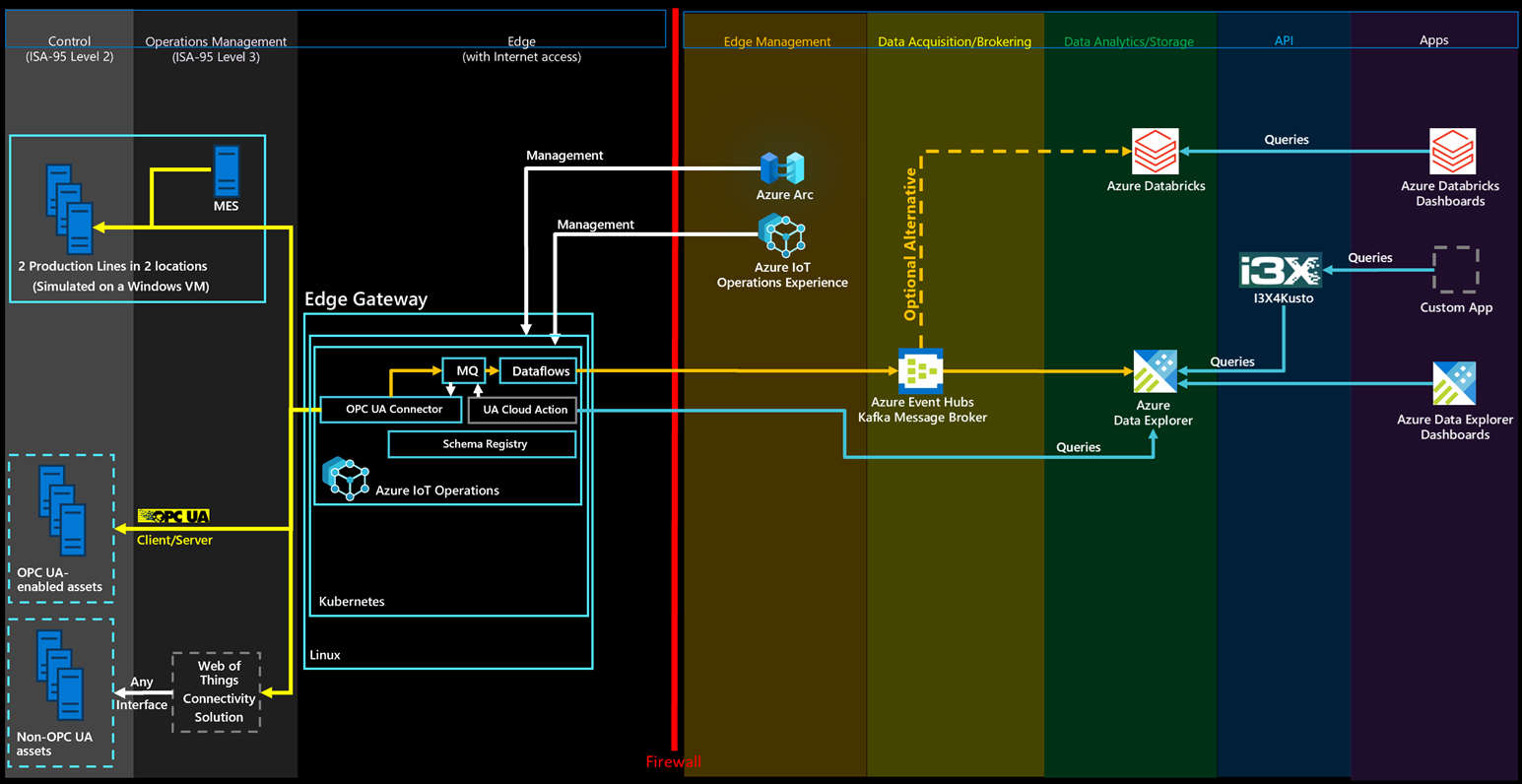
Azure Databricks is a unified, open analytics platform built on Apache Spark and the Delta Lake lakehouse architecture for building, deploying, and maintaining data engineering, data science, and machine learning workloads at scale. For this reference solution, it ingests the OPC UA telemetry from Azure Event Hubs by using Structured Streaming into governed Delta Lake tables. You get reliable, ACID-compliant storage with full history that combines the flexibility of a data lake with the performance of a data warehouse. Its collaborative notebooks, built-in machine learning and MLflow, and seamless integration with the rest of the Azure ecosystem make it well suited to advanced analytics such as forecasting and anomaly detection over your industrial data.
Automated deployment
The reference solution's deployment script can automatically deploy and configure Azure Databricks for you, as a second analytics option next to Azure Data Explorer. To enable Databricks, set the Deploy Databricks (deployDatabricks) parameter to true. ADX remains the default and is unaffected: Databricks reads the same data and metadata event hubs through a separate databricks consumer group, so both databases ingest the data side by side.
The deployment creates a Premium workspace and a serverless SQL warehouse. Deploy to a region that supports Databricks SQL Serverless.
Select the Deploy button to deploy all required resources to your Azure subscription:
Use the sample dashboard
The reference solution ships a sample AI/BI dashboard that mirrors the use cases of the Azure Data Explorer dashboard: condition monitoring, OEE calculation, energy consumption, production, and diagnostics for the Munich and Seattle production lines. The dashboard is already imported and published against a SQL warehouse - just open it from Dashboards in your workspace.
Run a query
With your data flowing into Delta Lake, you can query it by using SQL or PySpark. Here's an example query that joins metadata and telemetry – equivalent to the ADX/Fabric queries. Because the telemetry Subject is the numeric DataSetWriterId, the station and production line match on the metadata DataSetName (built from the OPC UA server's ApplicationUri and NodeId) and then join to the telemetry on Subject. (With Azure IoT Operations, the station and line usually aren't encoded in DataSetName, so point these filters at whatever your asset or dataset naming carries instead.)
-- The notebook creates these objects in the `ontologies` schema of your workspace catalog by default.
-- Replace <your_catalog> with your workspace catalog name (run `SELECT current_catalog()` to find it).
USE CATALOG `<your_catalog>`;
USE SCHEMA ontologies;

-- Find the status of all assembly stations in Munich in the last hour
SELECT
    m.DataSetName,
    m.DisplayName,
    m.Workcell,
    m.Line,
    t.Timestamp,
    t.Value
FROM opcua_metadata_lkv m
INNER JOIN opcua_telemetry t
    ON m.Subject = t.Subject
WHERE m.DataSetName LIKE '%assembly%'
  AND m.DataSetName LIKE '%munich%'
  AND t.Name = 'Status'
  AND t.Timestamp > current_timestamp() - INTERVAL 1 HOUR;