Note
Access to this page requires authorization. You can try signing in or changing directories.
Access to this page requires authorization. You can try changing directories.
Azure ExpressRoute
SAP HANA on Azure Large Instances
Azure Virtual Machines
Azure Virtual Network
Azure NetApp Files
This reference architecture describes proven practices for running SAP NetWeaver with Oracle Database on Azure in a high-availability (HA) configuration. The high-level architecture principles apply to supported operating systems. Unless otherwise specified, assume that this architecture uses Linux.
Note
To deploy this reference architecture, you need the appropriate licensing of SAP products and other non-Microsoft technologies.
Architecture
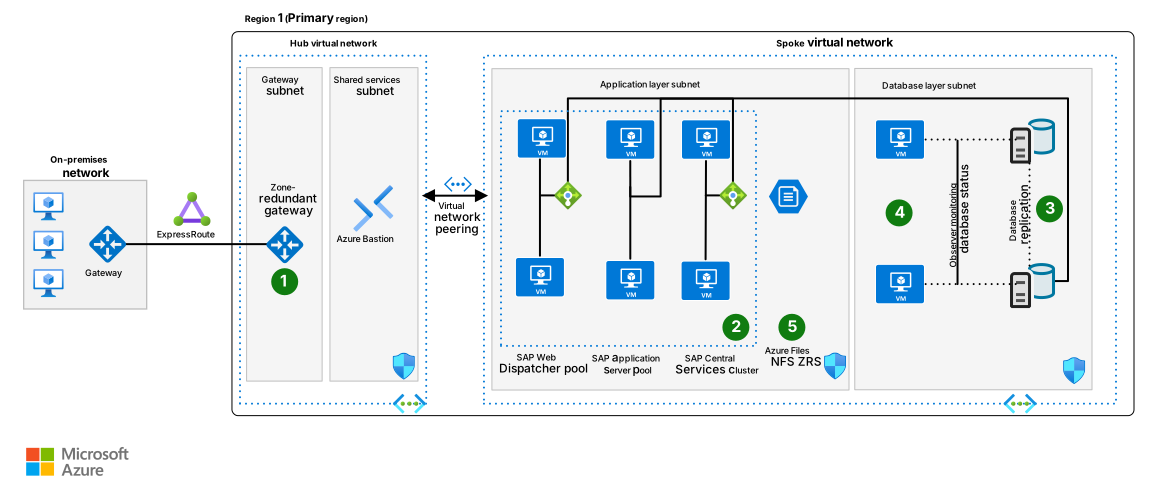
The following diagram shows a reference architecture for SAP on Oracle in Azure. We recommend that you deploy across two availability zones.
Download a Visio file of this architecture and related architectures.
Workflow
The following workflow corresponds to the previous diagram:
Users and enterprise systems connect from on-premises or peered Azure networks through the hub network into the SAP spoke virtual network.
SAP Web Dispatcher and SAP application servers process requests in the application tier and send database calls to the Oracle primary node.
Oracle Data Guard keeps a synced standby database in another availability zone, and Oracle Data Guard observer virtual machines (VMs) monitor replication and failover readiness.
If a database node or zone failure occurs, Oracle Data Guard fast-start failover promotes the standby node to primary, and SAP application servers reconnect to the new primary node.
Shared SAP file systems, such as
sapmntandtransportvolumes, remain available through the selected resilient Network File System (NFS) tier. Backup services protect database and application VMs.
Components
This reference architecture describes a typical SAP production system that runs on Oracle Database in Azure in a highly available setup to maximize system availability. You can adjust the architecture and its components based on business requirements, such as recovery time objective (RTO), recovery point objective (RPO), uptime expectations, and system role. For nonproduction environments or workloads that don't require HA, you can deploy the system on a single VM. The network layout is simplified to show the core architectural principles of an SAP environment and doesn't represent an entire enterprise network.
Networking
Virtual networks: Azure Virtual Network connects Azure resources to each other with enhanced security. In this architecture, the virtual network connects to on-premises through an ExpressRoute gateway that you deploy in the hub of a hub-spoke topology. This architecture contains SAP applications and databases in their own spoke virtual network and subdivides the virtual networks into separate subnets for each tier: application (SAP NetWeaver), the database, and shared services like Azure Bastion.
This architecture subdivides the virtual network address space into subnets. Place application servers on a separate subnet and database servers on another. By using this approach, you can secure servers more easily by managing the subnet security policies rather than the individual servers. You can also cleanly separate security rules applicable to databases from application servers.
Virtual network peering: This architecture uses a hub-and-spoke networking topology with multiple virtual networks that are peered together. This topology provides network segmentation and isolation for services deployed on Azure. Peering enables transparent connectivity between peered virtual networks through the Microsoft backbone network.
Zone-redundant gateway: A gateway connects distinct networks and extends your on-premises network to the Azure virtual network. We recommend that you use Azure ExpressRoute to create private connections that don't go over the public internet, but you can also use a site-to-site connection. Use zone-redundant ExpressRoute or VPN gateways to guard against zone failures. For more information about the differences between a zonal deployment and a zone-redundant deployment, see Reliability in Azure virtual network gateways. Gateways in a zone deployment require Standard SKU IP addresses.
Network security groups (NSGs): To restrict incoming, outgoing, and intrasubnet traffic in the virtual network, create NSGs and assign them to specific subnets. Workload-specific NSGs secure database and application subnets.
Application security groups (ASGs): To define fine-grained network security policies inside your NSGs based on application roles, use ASGs instead of explicit IP addresses. Assign VM network interfaces to ASGs, and use those groups as sources or destinations in NSG rules.
NICs: Network interface controllers (NICs) enable all communication among VMs on a virtual network. Traditional on-premises SAP deployments implement multiple NICs per machine to separate administrative traffic from business traffic.
On Azure, the virtual network is a software-defined network (SDN) that sends all traffic through the same network fabric. So it's not necessary to use multiple NICs for performance reasons. But if your organization needs to separate traffic, you can deploy multiple NICs per VM and connect each NIC to a different subnet. You can then use NSGs to enforce different access control policies on each subnet.
Azure NICs support multiple IP addresses. This support conforms with the SAP recommended practice to use virtual host names for installations. For a complete outline, see SAP note 962955. To access SAP notes, you need an SAP Service Marketplace account.
VMs
This architecture uses VMs. For the SAP application tier, the deployment uses VMs for all instance roles. These roles include SAP Web Dispatcher and SAP application servers, the central services instances SAP ASCS and Enqueue Replication Server (ERS), and the application servers Primary Application Server (PAS) and Additional Application Server (AAS). Adjust the number of VMs based on your requirements. For more information about how to run SAP NetWeaver on VMs, see Plan and implement an SAP deployment on Azure.
Similarly, the architecture uses VMs for all Oracle components, including the Oracle Database and the Oracle observer VMs. The observer VMs in this architecture are smaller than the database servers.
Constrained virtual CPU (vCPU) VMs: To potentially save costs on Oracle licensing, consider vCPU constrained VMs.
Certified VM families for SAP: For more information about SAP support for Azure VM types and throughput metrics (SAPS), see SAP note 1928533.
Proximity placement groups (PPGs): In most zonal deployments, latency inside the zone is sufficient for SAP applications. If measured latency between the application and database tiers affects the workload, use PPGs for the SAP ASCS/SCS and application-tier VMs. Keep database VMs out of the PPG to preserve flexibility for database VM resizing and SKU changes.
Generation 2 (Gen2) VMs: When you deploy VMs in Azure, you can choose either generation 1 (Gen1) or Gen2. Gen2 VMs support features that Gen1 doesn't provide. These features are important for large Oracle databases because some VM families, like Mv2 and Mdsv2, run only as Gen2 VMs. SAP on Azure certification for some newer VMs might also require Gen2 for full support, even if Azure supports both generations on those VMs. For more information, see SAP note 1928533 - Supported products and Azure VM types.
All other VMs that support SAP support either Gen2 only or both Gen1 and Gen2. We recommend that you deploy all SAP VMs as Gen2, even when the memory requirements are low. You can scale the smallest Gen2 VMs that were once deployed as Gen2 to the largest available VM with a simple deallocate and resize operation. Gen1 VMs can scale only to VM families that Azure supports for Gen1.
Storage
This architecture uses Azure managed disks for VMs and Azure file shares or Azure NetApp Files for any NFS shared storage requirements such as sapmnt and SAP transport NFS volumes. For more information about storage deployment with SAP on Azure, see Azure Storage types for SAP workload guide.
Certified storage for SAP: Similar to certified VM types for SAP usage, the details appear in SAP note 2015553 and SAP note 2039619.
Storage design for SAP on Oracle: Azure VMs Oracle database management system (DBMS) deployment for SAP workload describes a recommended storage design for SAP on Oracle in Azure. The article provides specific guidance about file system layout, disk sizing recommendations, and other storage options.
Store Oracle Database files: On Linux, use ext4 or XFS file systems for the database. On Windows, use New Technology File System (NTFS). The Oracle automatic storage management (ASM) feature is also supported for Oracle Database 12c Release 2 and higher.
Storage solution benefits: Azure Premium SSD v2 is designed for performance-critical workloads like SAP. For more information about this storage solution's benefits and limitations, see Deploy a Premium SSD v2.
Alternatives to managed disks: Alternatively, you can use Azure NetApp Files for the Oracle database. For more information, see SAP note 2039619 and Azure VMs Oracle database deployment for SAP workload. Azure Files NFS isn't supported for Oracle Database files, unlike Azure NetApp Files.
High availability
The previous architecture shows a highly available deployment, with each application layer contained on two or more VMs. It uses the following components.
On Azure, SAP workload deployment can be either regional or zonal, depending on the availability and resiliency requirements of the SAP applications and the selected region. Azure provides different deployment options, like Azure Virtual Machine Scale Sets with flexible orchestration (FD=1), availability zones, and availability sets to increase the availability of resources. For more information about the deployment options and their applicability across different Azure regions (including across zones, within a single zone, or in a region without zones), see HA architecture and scenarios for SAP NetWeaver.
Load balancers: An internal Azure load balancer distributes traffic to VMs in the SAP subnets. Azure Load Balancer supports zone-redundant distribution for zonal deployments of SAP.
Consider the decision factors when you deploy VMs between availability zones for SAP. Consider PPGs with an availability zone deployment and use them only for application-tier VMs.
Note
Availability zones provide intraregion HA, but zone-to-zone DR might not meet resilience requirements for a geographically widespread disaster. Select a DR region based on business and regulatory distance requirements, service availability, latency, and RPO/RTO targets.
Oracle-specific components: In zonal regions, you deploy Oracle Database VMs across different availability zones with the SAP-recommended Virtual Machine Scale Sets deployment model with the fault domain count set to 1 (FD=1). In regions without availability zones, use regional HA deployment options. Each VM contains its own installation of the database software and VM-local database storage. Set up synchronous database replication through Oracle Data Guard between the databases to ensure consistency and allow low RTO and RPO service times in case of individual failures. Besides the database VMs, an Oracle Data Guard fast-start failover setup requires extra VMs with Oracle Data Guard observer. The Oracle observer VMs monitor the database and replication status and facilitate database failover in an automated way, without any cluster manager. You can perform database replication management through Oracle Data Guard Broker. For more information, see Architectures for Oracle database on Azure Virtual Machines.
This architecture uses native Oracle tooling without cluster software or the need for a load balancer in the database tier. With Oracle Data Guard fast-start failover and SAP configuration, the failover process is automated and SAP applications reconnect to the new primary database if a failover occurs.
Various non‑Microsoft cluster solutions exist as alternatives, such as SIOS Protection Suite or Veritas InfoScale, and you can find deployment details in each vendor's documentation.
Oracle RAC: Oracle Real Application Clusters (RAC) isn't supported on Azure VMs. Oracle AI Database@Azure supports RAC deployments on Exadata, but that service isn't part of this architecture. For this VM-based design, Oracle Data Guard can provide HA and protection against rack, datacenter, or regional interruptions of service.
NFS tier: For highly available Linux-based SAP deployments, you must use a resilient NFS tier that provides NFS volumes for the SAP transport directory, the
sapmntvolume for SAP binaries, and extra volumes for the (A)SCS and ERS instances.Options to provide an NFS tier include:
Azure Files NFS with zone-redundant storage (ZRS). For more information, see SUSE Linux Enterprise Server (SLES) and Red Hat Enterprise Linux (RHEL).
Azure NetApp Files deployment of NFS volumes. For more information, see SLES and RHEL.
A VM-based NFS cluster that uses two extra VMs with local storage replicated between the VMs by Distributed Replicated Block Device (DRBD). For more information, see SLES and RHEL.
SAP Central Services cluster: This reference architecture runs Central Services on discrete VMs. Central Services becomes a potential single point of failure (SPoF) when you deploy it on a single VM. To implement a highly available solution, you need cluster management software that automates failover of the (A)SCS and ERS instances to the respective VM. This setup depends on the chosen NFS solution, so the configuration follows that solution's requirements.
Your cluster solution must determine which VM serves each service when software or infrastructure becomes unavailable. SAP on Azure provides two options for Linux-based STONITH implementations to handle unresponsive VMs or applications:
STONITH block device (SBD): SBD supports two forms. In the iSCSI form, you deploy one or three extra VMs that serve as iSCSI targets for a small shared block device. The cluster member VMs (the two (A)SCS/ERS VMs in this cluster pool) access this device regularly and use the SBD mounts to cast votes and achieve quorum for cluster decisions. This architecture doesn't include the extra SBD VMs. In the Azure shared-disk form, an Azure shared disk replaces the iSCSI target VMs, so no extra VMs are required. For zonal deployments, use a ZRS shared disk to maintain disk availability across zones.
Azure fence agent: This option uses the Azure Management API to fence failed nodes by stopping and restarting them through the Azure compute API. It requires no extra VMs.
For configuration steps and design details, see the guides linked in the NFS tier section. Non-Microsoft Azure-certified cluster managers can provide HA for SAP Central Services.
SAP application servers pool: Deploy two or more application servers. The SAP message server or web dispatchers load-balance requests to achieve HA. Each application server operates independently, and this pool of VMs doesn't require network load balancing.
SAP Web Dispatcher pool: The Web Dispatcher component balances SAP traffic among the SAP application servers. To achieve HA of the SAP Web Dispatcher, use either a failover cluster or a parallel Web Dispatcher setup, and place the dispatcher instances behind Load Balancer.
Embedded Web Dispatcher on (A)SCS is a special option. Account for proper sizing because of the extra workload on (A)SCS.
For internet-facing communications, we recommend a standalone solution in the perimeter network (also known as DMZ) to address security concerns.
Windows deployments: This article focuses primarily on Linux-based deployments. The same architectural principles apply to Windows. Oracle architecture doesn't differ between Linux and Windows.
For SAP application details, see Run SAP NetWeaver in Windows on Azure.
Considerations
These considerations implement the pillars of the Azure Well-Architected Framework, which is a set of guiding tenets that you can use to improve the quality of a workload. For more information, see Well-Architected Framework.
Reliability
Reliability helps ensure that your application can meet the commitments that you make to your customers. For more information, see Design review checklist for Reliability.
Disaster recovery
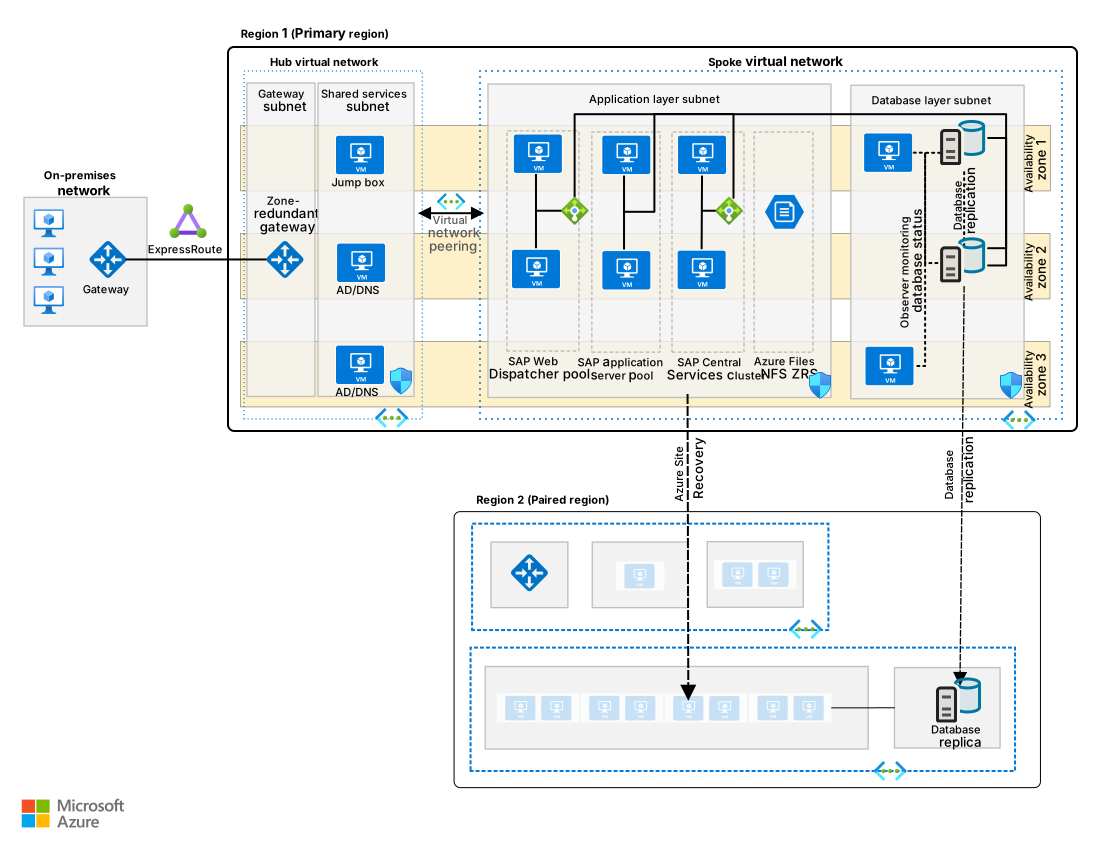
The following diagram shows the architecture of a production SAP system on Oracle in Azure. The architecture provides DR and uses availability zones.
Download a Visio file of this architecture and related architectures.
Every architectural layer in the SAP application stack uses a different approach to provide DR protection. For DR strategies and implementation details, see DR overview and infrastructure guidelines for SAP workload and DR guidelines for SAP application.
Backup
Backup for Oracle in Azure has several options:
Azure Backup: Scripts provided and maintained by Azure for Oracle Database and Azure Backup for Oracle address backup requirements.
Storage: Use file-based database backups, like the backups you schedule by using SAP's BR tools, and store and version them as files or directories on Azure Blob NFS, Azure Blob, or Azure Files storage services. For both Oracle data and log backups, see Backup strategies for Oracle Database on an Azure Linux VM.
External backup solutions: See the architecture guidance from a backup storage provider that supports Oracle in Azure.
For non-database VMs, we recommend Azure Backup for VMs to protect SAP application VMs and supporting infrastructure such as SAP Web Dispatcher.
Cost Optimization
Cost Optimization focuses on ways to reduce unnecessary expenses and improve operational efficiencies. For more information, see Design review checklist for Cost Optimization.
The main cost drivers in this architecture are:
Oracle and SAP-certified VM SKUs and the number of VMs across the application tier, database tier, and observer nodes.
Oracle licensing model decisions for OS and database software. Consider use of vCPU-constrained VM SKUs to reduce licensable cores where appropriate.
Storage performance tiers and provisioned capacity for Oracle data, log, backup, and shared NFS volumes.
Network and HA services, especially ExpressRoute or VPN gateways, load balancers, and cross-zone or cross-region replication traffic.
See the preconfigured estimate in the Azure pricing calculator for a medium-size Oracle highly available architecture to estimate costs for your selected topology and SKUs. To control spend:
Rightsize VM memory and CPU to the measured SAPS and Oracle throughput requirements.
Use higher-cost storage tiers only where latency and input/output operations per second (IOPS) requirements demand them.
Evaluate reservations or savings plans for steady-state compute after validating operational and licensing flexibility.
Contributors
Microsoft maintains this article. The following contributors wrote this article.
Principal author:
- Robert Biro | Senior Architect
To see nonpublic LinkedIn profiles, sign in to LinkedIn.
Next steps
- Cluster an SAP ASCS/SCS instance on a Windows failover cluster with a shared disk in Azure
- Plan and implement an SAP deployment on Azure
- Use Azure to host and run SAP workload scenarios
Communities can answer questions and help you set up a successful deployment. Consider these resources:
- Run SAP Applications on the Microsoft platform blog
- Azure community support
- SAP community
- Stack Overflow for SAP