After a recent Windows 11 update, standard checkboxes in classic Win32 applications (Visual Styles / Common Controls v6 NOT enabled, and DPI-unaware) render incorrectly on mixed-DPI multi-monitor setups. This is a regression: it does not occur on earlier builds and disappears when the update is uninstalled.
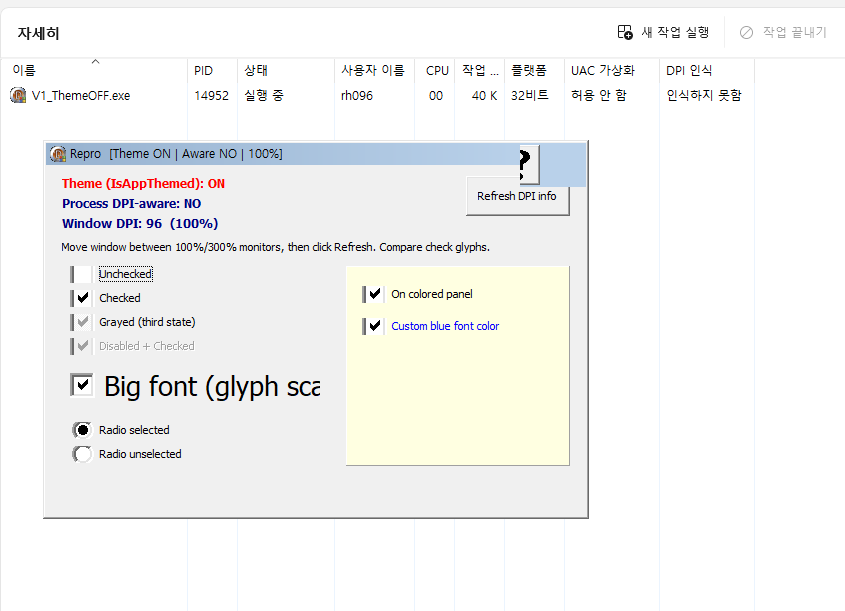
Symptom: the checkbox box is offset; the check glyph is the wrong size/position; the caption alignment is also incorrect. Always reproducible in the same environment.
When (build comparison): 26200.8655 = OK (not reproduced); 26200.8875 = reproduced; 26200.8894 (latest) = still reproduced. The regression was introduced between 26200.8655 and 26200.8875. Candidate updates: KB5095093 (26200.8737) or KB5101650 (26200.8875, 2026-07-14).
Environment: Windows 11 25H2 (build 26200.x) confirmed; 24H2 (26100.x) likely affected (same servicing base). Mixed-DPI multi-monitor, e.g. primary 1920x1080 @100% + secondary 3840x2160 @300%.
Triggering condition: occurs only when the app window is shown on a monitor whose scale is HIGHER than the primary monitor. It renders correctly on the primary monitor.
Steps to reproduce: (1) Windows 11 build 26200.8875 or later. (2) Two monitors at different scale factors (e.g., 100% and 300%). (3) Run a classic Win32 app that is DPI-unaware (no dpiAware manifest) and does NOT enable Visual Styles (no Microsoft.Windows.Common-Controls v6), containing standard checkboxes (e.g., built with a legacy toolchain such as Delphi 2007). (4) Move the window to the higher-scale (non-primary) monitor. Result: the checkbox box and check glyph are rendered at the wrong size/position. A minimal reproduction sample can be provided.
What we confirmed - renders correctly when: all monitors use the same scale (100%); the update is uninstalled; the higher-scale monitor is set as the primary (reboot); or Visual Styles (Common Controls v6) are enabled. No effect: Compatibility "Override high DPI scaling behavior" (Application / System / System (Enhanced)).
Analysis (hypothesis): without Visual Styles, classic checkboxes appear to be drawn via DrawFrameControl, which does not participate in DPI virtualization and seems to size the glyph using the primary monitor's DPI. Under mixed DPI this misaligns the glyph and the box on a higher-scale monitor. A recent update appears to have changed this behavior.
Request: since uninstalling the update restores normal behavior, this appears to be a Windows regression. Could you confirm this issue and advise on a fix, a Known Issue Rollback (KIR), or official guidance? Legacy Win32 applications that use classic common controls without Visual Styles are affected. We can provide a minimal reproduction sample, screenshots, and logs on request.
Win11_Checkbox_Regression_Report.txt
Win11_CheckBox_Rendering_Expected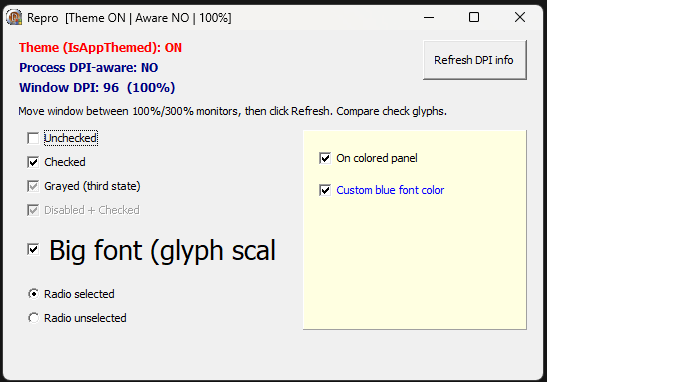
**Win11_CheckBox_Rendering_Bug
**
' cx='32' cy='32' r='32' /%3E%3Ctext x='50%25' y='55%25' dominant-baseline='middle' text-anchor='middle' fill='%23FFF' %3EA%3C/text%3E%3C/svg%3E)

' cx='32' cy='32' r='32' /%3E%3Ctext x='50%25' y='55%25' dominant-baseline='middle' text-anchor='middle' fill='%23FFF' %3EOA%3C/text%3E%3C/svg%3E)
' cx='32' cy='32' r='32' /%3E%3Ctext x='50%25' y='55%25' dominant-baseline='middle' text-anchor='middle' fill='%23FFF' %3ELV%3C/text%3E%3C/svg%3E)